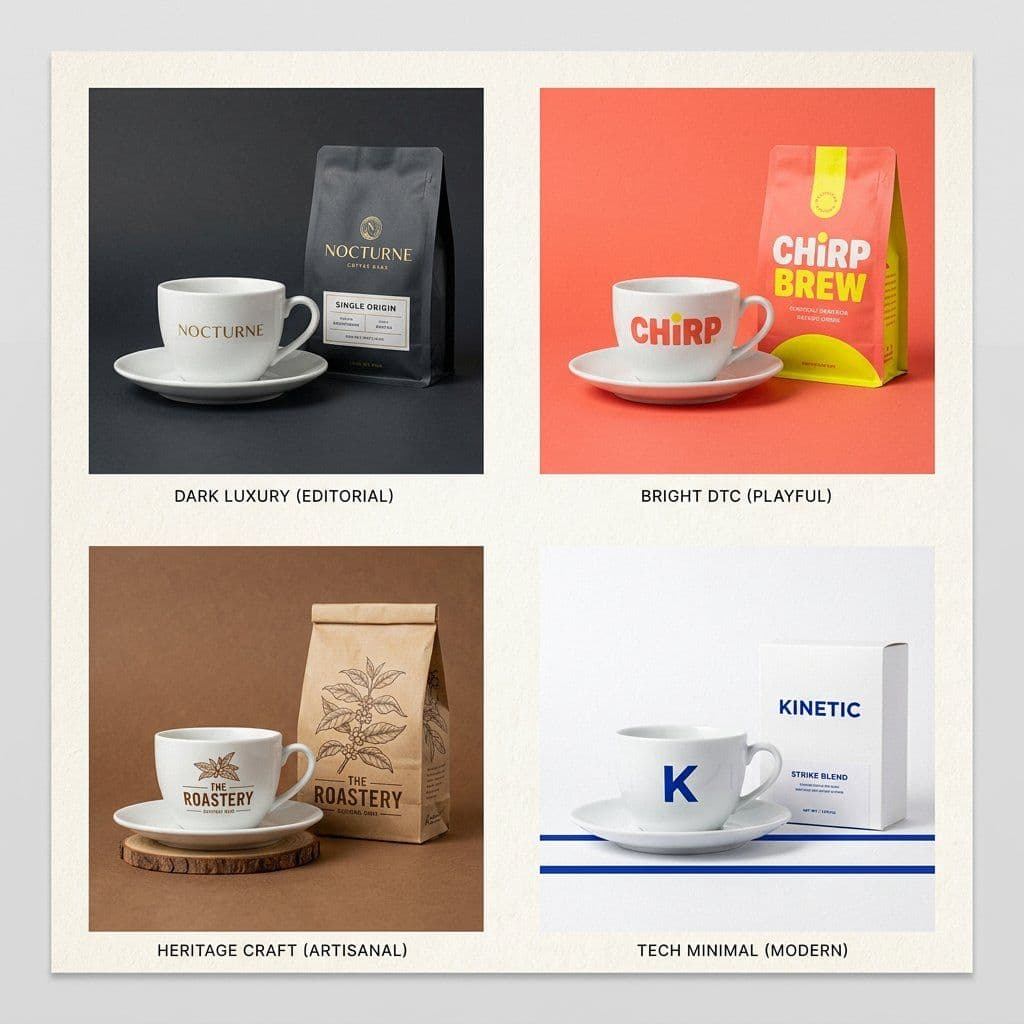
Brand envelope product ad board comparing the same coffee product across dark luxury, bright DTC, heritage craft, and tech minimal brand directions.1:1
Brand envelope product ad board comparing the same coffee product across dark luxury, bright DTC, heritage craft, and tech minimal brand directions.

Product Photography

Brand Envelope Product Ad

An AI brand envelope product ad prompt example for quickly testing one product across four contrasting brand personalities while preserving the same object.

AI brand envelope product ad prompt exampleBrand EnvelopeProduct positioning board
Published Updated

Prompt template

Brand Envelope Product Ad reusable AI image prompt

Create "The Brand Envelope" product advertising board for [PRODUCT].

Goal: show how the same product can live inside four different brand personalities while keeping its core shape, function, and category recognizable.

Center rule: the product must stay consistent across every frame. Keep the same object type, approximate camera angle, scale, and product role while changing only brand expression.

Create a 2x2 board with four labeled directions:
- Dark Luxury: black, charcoal, brass, editorial shadows, quiet premium mood, restrained typography.
- Bright DTC: vivid color, playful packaging, friendly direct-to-consumer energy, clean social ad style.
- Heritage Craft: warm paper, handmade texture, artisanal cues, natural materials, trusted local brand feeling.
- Tech Minimal: white space, blue or silver accents, precise alignment, modern system design, clean typography.

For each quadrant, include the product, packaging or container, one supporting prop, matching background material, campaign lighting, and a small label describing the brand direction.

Finish: professional advertising art direction, realistic product photography, crisp packaging surfaces, tidy board layout, distinct palettes, and strong comparison value.

Style: AI brand envelope product ad prompt example, Brand Envelope, product positioning board, packaging moodboard, four brand personalities, ecommerce creative direction.

Negative prompt

different products in each quadrant, copied real brand names, messy label text, inconsistent camera angle, weak product visibility, generic mockups, cluttered props, low-quality packaging, unreadable labels
Prompt-specific breakdownWhat makes this prompt different.
Subject and scene

Create "The Brand Envelope" product advertising board for [PRODUCT]

Keep this cue visible when adapting the prompt for another ai brand envelope product ad prompt example for product positioning tests, packaging moodboards, ecommerce creative direction, and brand personality exploration image.
Composition and hierarchy

Goal: show how the same product can live inside four different brand personalities while keeping its core shape, function, and category recognizable

Use this part to protect the 1:1 layout and avoid a generic composition.
Lighting and material cues

Center rule: the product must stay consistent across every frame

Treat this as the quality control layer for the product positioning campaign board look.
Style and output constraints

Keep the same object type, approximate camera angle, scale, and product role while changing only brand expression

Preserve this constraint when changing the subject, brand, product, or channel.
Variation promptsRewrite this example for nearby use cases.

These variations keep the core image logic from this prompt while changing one variable at a time.

Change the subject

Create a 1:1 product photography image for [new subject]. Keep this prompt logic: Create "The Brand Envelope" product advertising board for [PRODUCT]. Use Product positioning campaign board styling for AI brand envelope product ad prompt example for product positioning tests, packaging moodboards, ecommerce creative direction, and brand personality exploration, but replace the product, character, place, or audience with [your brief].

Change the channel

Adapt this concept for [ad, product page, thumbnail, story, poster, or hero image]. Preserve the Goal: show how the same product can live inside four different brand personalities while keeping its core shape, function, and category recognizable and keep the result focused on AI brand envelope product ad prompt example for product positioning tests, packaging moodboards, ecommerce creative direction, and brand personality exploration. Adjust crop, spacing, and visual hierarchy for the new channel.

Change the visual mood

Generate a new version with [brighter, darker, more premium, more playful, more editorial, or more minimal] mood. Keep Center rule: the product must stay consistent across every frame as the style anchor and avoid changing the core subject unless the brief requires it.

Review checklistCheck the generated image before reusing it.
  • Confirm the image clearly supports AI brand envelope product ad prompt example for product positioning tests, packaging moodboards, ecommerce creative direction, and brand personality exploration and does not drift into a generic product photography result.
  • Check the main prompt cue: Create "The Brand Envelope" product advertising board for [PRODUCT]
  • Review the 1:1 crop for subject placement, negative space, and channel fit.
  • Compare the output against the intended product positioning campaign board style before publishing or reusing it.
  • Use the negative prompt to reduce these known issues: different products in each quadrant, copied real brand names, messy label text, inconsistent camera angle, weak product visibility, generic mockups, cluttered props, low-quality packaging, unreadable labels
Prompt FAQCommon questions about this AI image prompt.

What can I create with the Brand Envelope Product Ad prompt?

You can use it to create AI brand envelope product ad prompt example for product positioning tests, packaging moodboards, ecommerce creative direction, and brand personality exploration in a Product positioning campaign board style, with a recommended 1:1 aspect ratio and search-friendly image direction.

Can I edit this AI image prompt for another subject?

Yes. Replace the subject, product, place, audience, or brand details while preserving the lighting, composition, aspect ratio, and quality constraints that give the prompt its structure.

Which aspect ratio works best for this prompt?

This example is designed around a 1:1 aspect ratio. You can change it for another channel, but keep the framing and hierarchy consistent when moving to square, vertical, or wide formats.

Should I use the negative prompt?

Yes. The negative prompt helps reduce issues such as different products in each quadrant, copied real brand names, messy label text, inconsistent camera angle, weak product visibility, generic mockups, cluttered props, low-quality packaging, unreadable labels. Use it as a starting point and add exclusions after reviewing your first result.