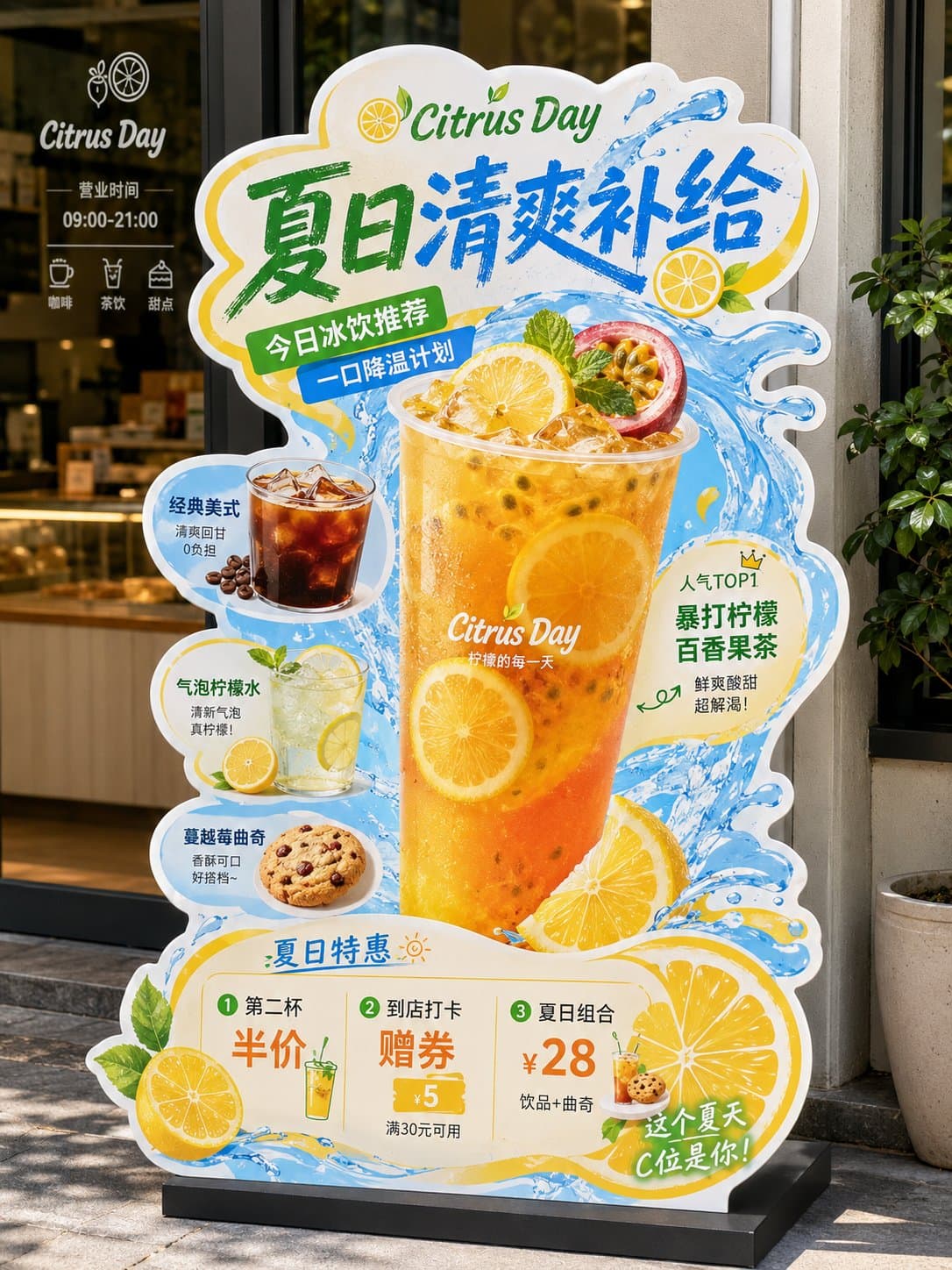
Irregular citrus beverage restaurant standee with a large iced fruit tea, splash graphics, offer blocks, snack modules, and complete display base.3:4
Irregular citrus beverage restaurant standee with a large iced fruit tea, splash graphics, offer blocks, snack modules, and complete display base.

Product Photography

Citrus Beverage Restaurant Standee

An AI restaurant standee prompt example for a citrus beverage promotion with irregular POP display shape, product hierarchy, offer blocks, and storefront-ready food visuals.

AI restaurant standee prompt exampleCitrus beveragePOP display
Published Updated

Prompt template

Citrus Beverage Restaurant Standee reusable AI image prompt

Create a complete irregular restaurant standee display for a citrus beverage promotion. Show only the finished standee object on a clean white background, with the full cutout outline, complete base, and no real store environment.

Brand concept: a fresh local drink shop called "Citrus Day". Main headline: "SUMMER CITRUS REFRESH". Subheading: "Iced drinks for hot days". Theme: bright lemon, passion fruit, sparkling water, cafe snacks, and a cool splash effect. Use a 3:4 vertical composition.

Standee structure: use a non-rectangular die-cut silhouette with white trim and energetic splash edges. The top area carries the oversized headline in bold hand-painted POP lettering. The center area features a huge transparent cup of iced citrus passion fruit tea as the hero product, with realistic ice cubes, lemon slices, mint, condensation, and orange-yellow gradient drink color.

Support products: add smaller circular or sticker-style modules around the hero product showing iced Americano, sparkling lemon water, berry cookie, and a small combo set. Use clean labels, short callouts, hand-drawn arrows, price badges, and recommendation stickers.

Bottom promotion area: include three readable offer blocks such as "Second cup half price", "Coupon inside", and "Combo $28". Keep price numbers bold and easy to read. Do not add QR codes.

Visual style: realistic commercial beverage photography combined with restaurant POP display design, appetizing product detail, bright blue water-splash graphics, fresh green and yellow accents, high-conversion local store material, complete printable standee mockup, sharp edges, clear hierarchy, storefront-ready finish.

Negative prompt

restaurant interior, glass door background, wall poster mockup, missing base, cropped standee, normal rectangle poster, unreadable pricing, QR code, messy labels, flat food render, low appetite appeal
How to adapt this prompt

Turn the example into your own brief.

Replace the subject, product, place, or audience.Keep the composition and camera language, then swap the object, brand, city, or customer.
Preserve lighting and material constraints.Reuse the lighting, texture, and finish details that make the image feel specific.
Match the aspect ratio to the channel.Move between square, vertical, and wide crops based on ads, posts, covers, or landing pages.
Tighten the negative prompt after review.Add exclusions for text errors, distorted objects, clutter, or style drift after the first result.

What this prompt is good for

Citrus Beverage Restaurant Standee is built for AI restaurant standee prompt example for beverage launches and local store promotions.

Use this AI image prompt when you need a focused Product Photography result with a clear style direction, a defined format, and enough visual constraints to avoid generic output.

  • Best search intent: AI restaurant standee prompt example, Citrus beverage, and POP display
  • Primary workflow: AI restaurant standee prompt example for beverage launches and local store promotions
  • Recommended output format: 3:4

Prompt breakdown

Key controls inside this Restaurant POP standee display prompt.

The prompt combines subject direction, lighting, composition, visual style, and output quality in one reusable brief. Keep those constraints together when you adapt it for your own image.

  • Style anchor: Restaurant POP standee display
  • Category context: Product Photography
  • Includes a negative prompt to reduce style drift, distorted details, and unwanted artifacts.

Best variations to try

Adapt this prompt without losing the original image logic.

Start by changing the subject, product, place, color palette, or audience. Keep the camera language and visual hierarchy stable until the result matches the page, ad, post, or campaign you are building.

  • Swap the subject while keeping the 3:4 composition.
  • Turn the style into a new campaign by changing colors, wardrobe, props, or location.
  • Use the prefilled generator link to test the prompt, then refine one variable at a time.

Prompt FAQ

Common questions about this AI image prompt.

What can I create with the Citrus Beverage Restaurant Standee prompt?

You can use it to create AI restaurant standee prompt example for beverage launches and local store promotions in a Restaurant POP standee display style, with a recommended 3:4 aspect ratio and search-friendly image direction.

Can I edit this AI image prompt for another subject?

Yes. Replace the subject, product, place, audience, or brand details while preserving the lighting, composition, aspect ratio, and quality constraints that give the prompt its structure.

Which aspect ratio works best for this prompt?

This example is designed around a 3:4 aspect ratio. You can change it for another channel, but keep the framing and hierarchy consistent when moving to square, vertical, or wide formats.

Should I use the negative prompt?

Yes. The negative prompt helps reduce issues such as restaurant interior, glass door background, wall poster mockup, missing base, cropped standee, normal rectangle poster, unreadable pricing, QR code, messy labels, flat food render, low appetite appeal. Use it as a starting point and add exclusions after reviewing your first result.