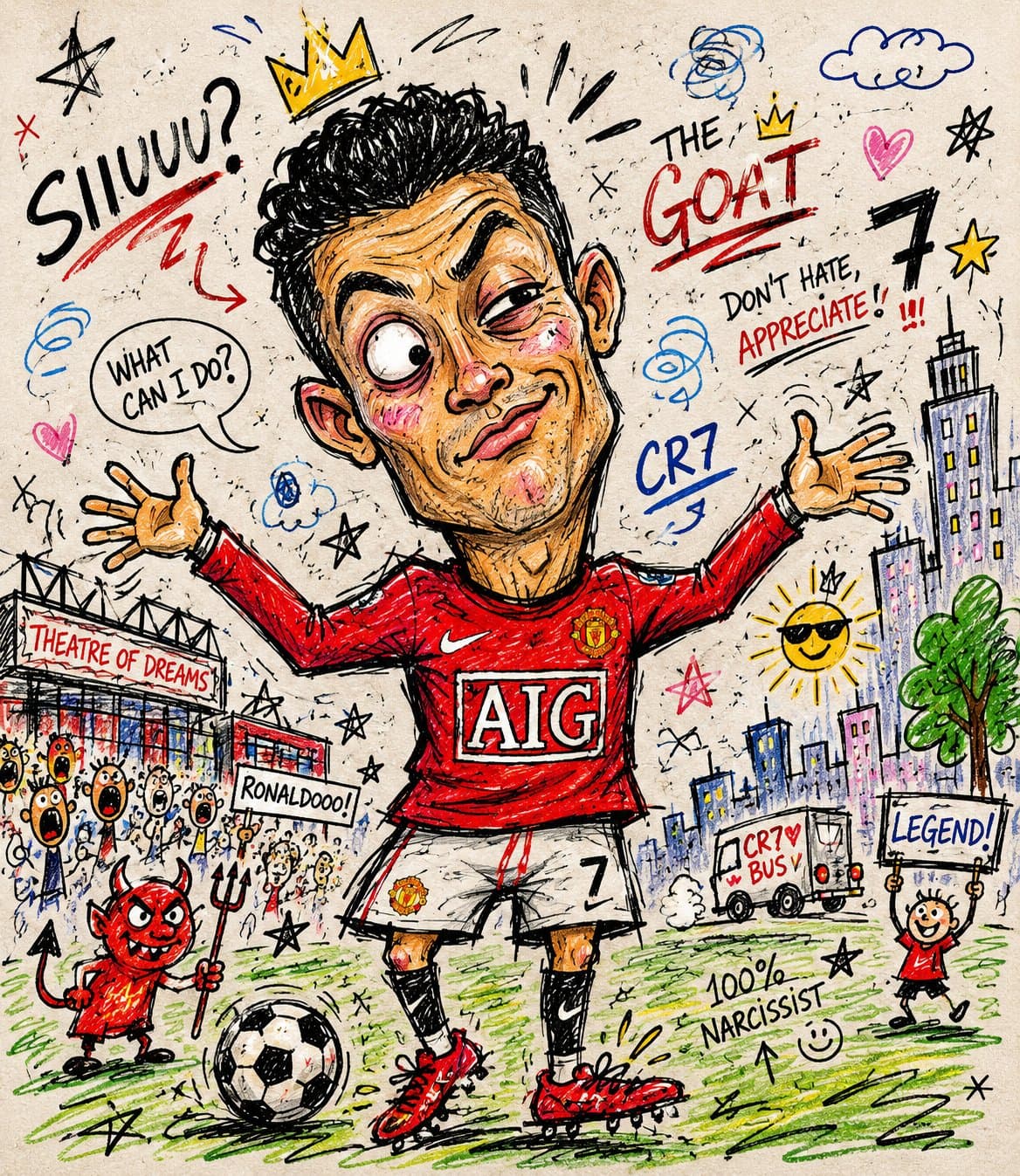
Chaotic doodle portrait illustration with cheap marker texture, exaggerated features, messy scribbles, paper grain, and playful meme-style marks.1:1
Chaotic doodle portrait illustration with cheap marker texture, exaggerated features, messy scribbles, paper grain, and playful meme-style marks.

Editorial Visuals

Chaotic Doodle Portrait Illustration

An AI doodle portrait prompt example for turning a photo into a funny low-skill marker sketch with messy lines, cheap marker texture, paper grain, and meme-style chaos.

AI doodle portrait prompt exampleCheap marker sketchFunny photo edit
Published Updated

Prompt template

Chaotic Doodle Portrait Illustration reusable AI image prompt

Turn the uploaded photo into a chaotic funny doodle illustration, intentionally messy and low-skill, as if drawn quickly with a cheap marker, crayon, or worn-out felt pen on paper.

Create exaggerated facial features with awkward proportions, uneven eyes, oversized head, tiny body, crooked smile, and clumsy anatomy while still keeping the person recognizable. Use rough childish sketch lines, shaky hand-drawn strokes, visible scribbles, overlapping outlines, accidental marks, and random doodles around the scene.

Add a simple cartoon-style background with badly drawn buildings, trees, clouds, street elements, and uneven perspective. Coloring should look careless and imperfect, with visible stroke texture, inconsistent fill areas, wax crayon texture, marker bleed, and irregular shading.

Include playful imperfections like crossed-out lines, unfinished details, random arrows, tiny notes, stars, swirls, and abstract scribbles. Overall aesthetic should feel humorous, spontaneous, handmade, energetic, goofy, and intentionally unpolished, resembling a child's sketchbook mixed with absurd internet meme art. Use high texture detail, visible paper grain, asymmetrical composition, awkward framing, expressive doodle chaos, and raw sketch energy.

Negative prompt

polished vector illustration, clean anatomy, elegant portrait, perfect symmetry, realistic painting, smooth digital airbrush, neat comic panel, low paper texture, serious editorial mood
How to adapt this prompt

Turn the example into your own brief.

Replace the subject, product, place, or audience.Keep the composition and camera language, then swap the object, brand, city, or customer.
Preserve lighting and material constraints.Reuse the lighting, texture, and finish details that make the image feel specific.
Match the aspect ratio to the channel.Move between square, vertical, and wide crops based on ads, posts, covers, or landing pages.
Tighten the negative prompt after review.Add exclusions for text errors, distorted objects, clutter, or style drift after the first result.

What this prompt is good for

Chaotic Doodle Portrait Illustration is built for AI doodle portrait prompt example for meme portraits and playful illustration edits.

Use this AI image prompt when you need a focused Editorial Visuals result with a clear style direction, a defined format, and enough visual constraints to avoid generic output.

  • Best search intent: AI doodle portrait prompt example, Cheap marker sketch, and Funny photo edit
  • Primary workflow: AI doodle portrait prompt example for meme portraits and playful illustration edits
  • Recommended output format: 1:1

Prompt breakdown

Key controls inside this Messy low-skill doodle portrait prompt.

The prompt combines subject direction, lighting, composition, visual style, and output quality in one reusable brief. Keep those constraints together when you adapt it for your own image.

  • Style anchor: Messy low-skill doodle portrait
  • Category context: Editorial Visuals
  • Includes a negative prompt to reduce style drift, distorted details, and unwanted artifacts.

Best variations to try

Adapt this prompt without losing the original image logic.

Start by changing the subject, product, place, color palette, or audience. Keep the camera language and visual hierarchy stable until the result matches the page, ad, post, or campaign you are building.

  • Swap the subject while keeping the 1:1 composition.
  • Turn the style into a new campaign by changing colors, wardrobe, props, or location.
  • Use the prefilled generator link to test the prompt, then refine one variable at a time.

Prompt FAQ

Common questions about this AI image prompt.

What can I create with the Chaotic Doodle Portrait Illustration prompt?

You can use it to create AI doodle portrait prompt example for meme portraits and playful illustration edits in a Messy low-skill doodle portrait style, with a recommended 1:1 aspect ratio and search-friendly image direction.

Can I edit this AI image prompt for another subject?

Yes. Replace the subject, product, place, audience, or brand details while preserving the lighting, composition, aspect ratio, and quality constraints that give the prompt its structure.

Which aspect ratio works best for this prompt?

This example is designed around a 1:1 aspect ratio. You can change it for another channel, but keep the framing and hierarchy consistent when moving to square, vertical, or wide formats.

Should I use the negative prompt?

Yes. The negative prompt helps reduce issues such as polished vector illustration, clean anatomy, elegant portrait, perfect symmetry, realistic painting, smooth digital airbrush, neat comic panel, low paper texture, serious editorial mood. Use it as a starting point and add exclusions after reviewing your first result.