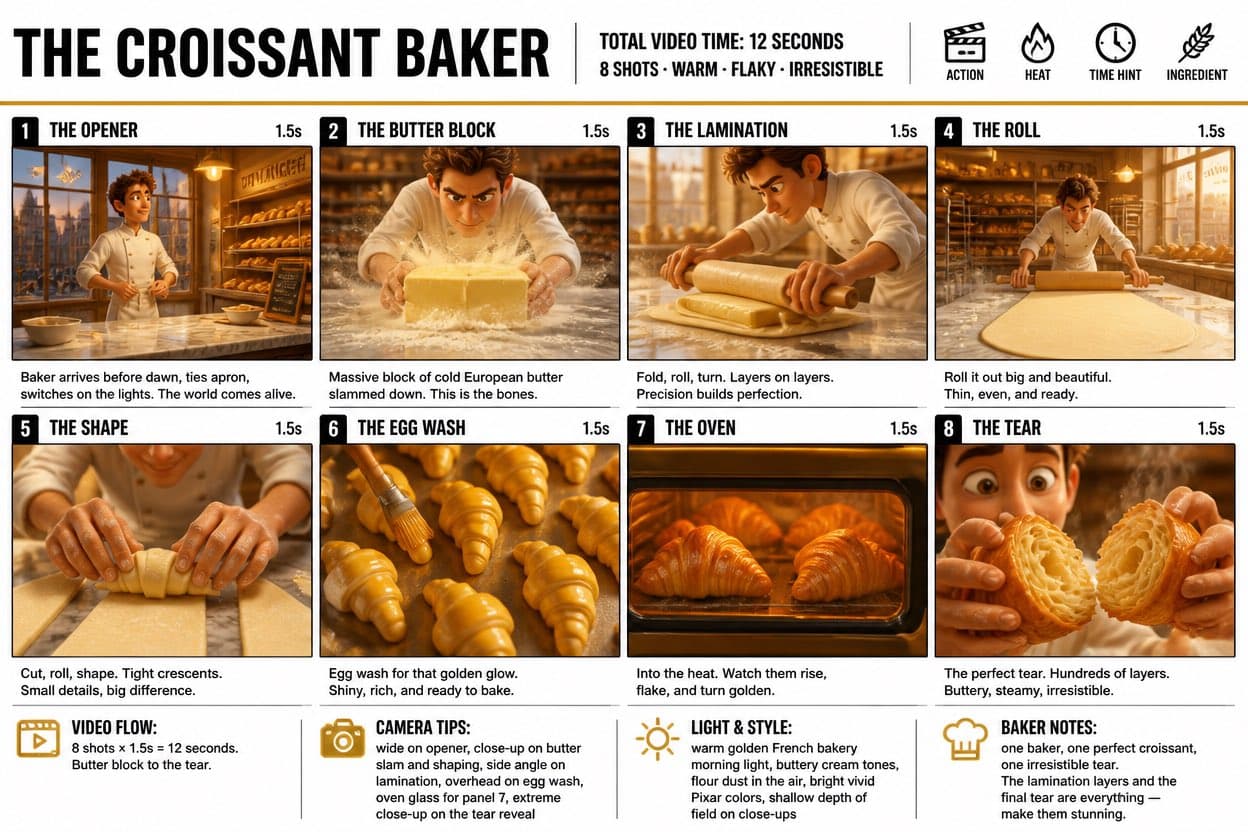
Croissant baking storyboard poster titled The Croissant Baker with eight numbered panels showing butter, lamination, rolling, shaping, egg wash, oven, and flaky tear steps.3:2
Croissant baking storyboard poster titled The Croissant Baker with eight numbered panels showing butter, lamination, rolling, shaping, egg wash, oven, and flaky tear steps.

Editorial Visuals

Croissant Baking Storyboard Poster

An AI croissant baking storyboard prompt example for a clear food process poster with eight cinematic panels, timing notes, camera cues, and bakery styling.

AI croissant baking storyboard prompt exampleTHE CROISSANT BAKERFood process infographic
Published Updated

Prompt template

Croissant Baking Storyboard Poster reusable AI image prompt

Create a crisp infographic storyboard poster titled "THE CROISSANT BAKER".

Format: wide 16:9 poster, clean white background, bold black typography, clear black panel borders, warm golden bakery palette, and premium stylized 3D food rendering.

Header: large title "THE CROISSANT BAKER"; add production notes such as "Total video time: 12 seconds" and "8 shots - warm - flaky - irresistible". Include small icons for action, heat, time hint, and ingredient.

Storyboard panels: create eight numbered shots, each with a 1.5 second timing marker.
1. The Opener: baker arrives before dawn and turns on the bakery lights.
2. The Butter Block: cold butter lands on a floured work surface.
3. The Lamination: dough is folded and rolled into clean layers.
4. The Roll: the dough sheet is rolled thin and even.
5. The Shape: hands cut and roll tight crescent shapes.
6. The Egg Wash: glossy egg wash brushes across rows of croissants.
7. The Oven: croissants rise behind warm oven glass.
8. The Tear: close-up of one finished croissant split open to reveal flaky layers.

Bottom notes: add compact blocks for video flow, camera tips, light and style, and baker notes.

Mood: warm French bakery morning light, buttery colors, flour dust, crisp labels, appetizing texture, and a clear production-board layout.

Style: AI croissant baking storyboard prompt example, THE CROISSANT BAKER, food process infographic, bakery storyboard poster, short-form recipe video planning.

Negative prompt

messy panel order, unreadable title, raw dough that looks unappetizing, random recipe steps, real bakery logo, distorted hands, dark dirty kitchen, inconsistent character, crowded captions
Prompt-specific breakdownWhat makes this prompt different.
Subject and scene

Create a crisp infographic storyboard poster titled "THE CROISSANT BAKER"

Keep this cue visible when adapting the prompt for another ai croissant baking storyboard prompt example for food video planning, bakery process infographics, recipe visuals, and short-form commercial storyboards image.
Composition and hierarchy

Format: wide 16:9 poster, clean white background, bold black typography, clear black panel borders, warm golden bakery palette, and premium stylized 3D food rendering

Review text carefully after generation because typography is often the first place image models drift.
Lighting and material cues

Header: large title "THE CROISSANT BAKER"

Treat this as the quality control layer for the food process storyboard infographic look.
Style and output constraints

add production notes such as "Total video time: 12 seconds" and "8 shots - warm - flaky - irresistible"

Preserve this constraint when changing the subject, brand, product, or channel.
Variation promptsRewrite this example for nearby use cases.

These variations keep the core image logic from this prompt while changing one variable at a time.

Change the subject

Create a 3:2 editorial visuals image for [new subject]. Keep this prompt logic: Create a crisp infographic storyboard poster titled "THE CROISSANT BAKER". Use Food process storyboard infographic styling for AI croissant baking storyboard prompt example for food video planning, bakery process infographics, recipe visuals, and short-form commercial storyboards, but replace the product, character, place, or audience with [your brief].

Change the channel

Adapt this concept for [ad, product page, thumbnail, story, poster, or hero image]. Preserve the Format: wide 16:9 poster, clean white background, bold black typography, clear black panel borders, warm golden bakery palette, and premium stylized 3D food rendering and keep the result focused on AI croissant baking storyboard prompt example for food video planning, bakery process infographics, recipe visuals, and short-form commercial storyboards. Adjust crop, spacing, and visual hierarchy for the new channel.

Change the visual mood

Generate a new version with [brighter, darker, more premium, more playful, more editorial, or more minimal] mood. Keep Header: large title "THE CROISSANT BAKER" as the style anchor and avoid changing the core subject unless the brief requires it.

Review checklistCheck the generated image before reusing it.
  • Confirm the image clearly supports AI croissant baking storyboard prompt example for food video planning, bakery process infographics, recipe visuals, and short-form commercial storyboards and does not drift into a generic editorial visuals result.
  • Check the main prompt cue: Create a crisp infographic storyboard poster titled "THE CROISSANT BAKER"
  • Review the 3:2 crop for subject placement, negative space, and channel fit.
  • Compare the output against the intended food process storyboard infographic style before publishing or reusing it.
  • Use the negative prompt to reduce these known issues: messy panel order, unreadable title, raw dough that looks unappetizing, random recipe steps, real bakery logo, distorted hands, dark dirty kitchen, inconsistent character, crowded captions
Prompt FAQCommon questions about this AI image prompt.

What can I create with the Croissant Baking Storyboard Poster prompt?

You can use it to create AI croissant baking storyboard prompt example for food video planning, bakery process infographics, recipe visuals, and short-form commercial storyboards in a Food process storyboard infographic style, with a recommended 3:2 aspect ratio and search-friendly image direction.

Can I edit this AI image prompt for another subject?

Yes. Replace the subject, product, place, audience, or brand details while preserving the lighting, composition, aspect ratio, and quality constraints that give the prompt its structure.

Which aspect ratio works best for this prompt?

This example is designed around a 3:2 aspect ratio. You can change it for another channel, but keep the framing and hierarchy consistent when moving to square, vertical, or wide formats.

Should I use the negative prompt?

Yes. The negative prompt helps reduce issues such as messy panel order, unreadable title, raw dough that looks unappetizing, random recipe steps, real bakery logo, distorted hands, dark dirty kitchen, inconsistent character, crowded captions. Use it as a starting point and add exclusions after reviewing your first result.