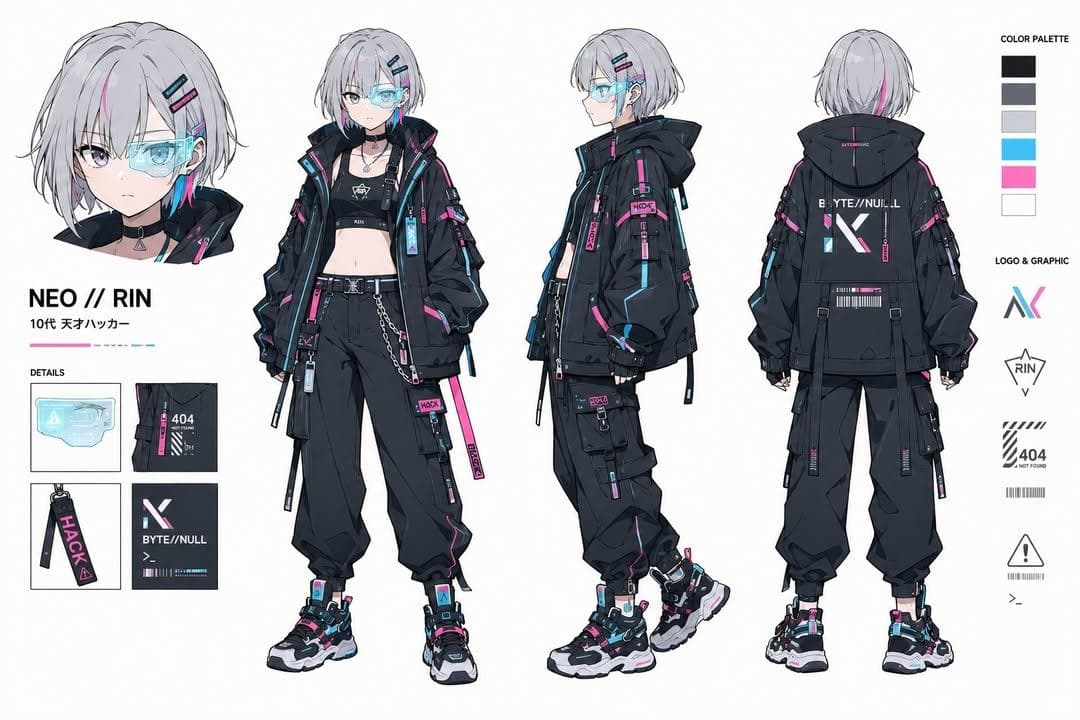
Create an ultra-detailed cyberpunk hacker character design sheet for an original young adult genius technologist named [CHARACTER NAME]. Build a professional reference sheet with a full-body turnaround including front view, side view, back view, close-up portrait, accessory callouts, color palette, logo marks, UI graphics, and gadget details.
Character: short silver-white bob haircut with neon cyan and magenta streaks, translucent cyber visor over one eye, pale skin, sharp violet eyes, calm confident expression, futuristic techwear jacket, black tactical cargo pants, layered belts, utility tags, cropped inner top, futuristic sneakers, holographic accessories, barcode decals, warning symbols, and clean cyber typography.
Layout: white background, precise concept-art grid, labeled detail boxes, material swatches, prop callouts, small interface decals, and readable title area. Keep the silhouette dynamic and fashion-forward while preserving a usable production reference sheet.
Style: AI character design sheet prompt example, polished anime concept art, futuristic streetwear, cyberpunk fashion, clean cel shading, crisp line art, soft glow effects, layered accessories, professional game concept art quality, ultra detailed.
Negative prompt
underage styling, messy unreadable labels, copied franchise character, distorted anatomy, random text artifacts, low-detail clothing, cluttered background, blurry line art
How to adapt this prompt
Turn the example into your own brief.
Replace the subject, product, place, or audience.Keep the composition and camera language, then swap the object, brand, city, or customer.Preserve lighting and material constraints.Reuse the lighting, texture, and finish details that make the image feel specific.Match the aspect ratio to the channel.Move between square, vertical, and wide crops based on ads, posts, covers, or landing pages.Tighten the negative prompt after review.Add exclusions for text errors, distorted objects, clutter, or style drift after the first result. What this prompt is good for
Cyberpunk Hacker Character Design Sheet is built for AI character design sheet prompt example for game concepts, creator avatars, and cyberpunk brand visuals.
Use this AI image prompt when you need a focused Brand Design result with a clear style direction, a defined format, and enough visual constraints to avoid generic output.
- Best search intent: AI character design sheet prompt example, Cyberpunk hacker, and Game concept art
- Primary workflow: AI character design sheet prompt example for game concepts, creator avatars, and cyberpunk brand visuals
- Recommended output format: 3:2
Prompt breakdown
Key controls inside this Cyberpunk anime character reference sheet prompt.
The prompt combines subject direction, lighting, composition, visual style, and output quality in one reusable brief. Keep those constraints together when you adapt it for your own image.
- Style anchor: Cyberpunk anime character reference sheet
- Category context: Brand Design
- Includes a negative prompt to reduce style drift, distorted details, and unwanted artifacts.
Best variations to try
Adapt this prompt without losing the original image logic.
Start by changing the subject, product, place, color palette, or audience. Keep the camera language and visual hierarchy stable until the result matches the page, ad, post, or campaign you are building.
- Swap the subject while keeping the 3:2 composition.
- Turn the style into a new campaign by changing colors, wardrobe, props, or location.
- Use the prefilled generator link to test the prompt, then refine one variable at a time.
Prompt FAQ
Common questions about this AI image prompt.
What can I create with the Cyberpunk Hacker Character Design Sheet prompt?
You can use it to create AI character design sheet prompt example for game concepts, creator avatars, and cyberpunk brand visuals in a Cyberpunk anime character reference sheet style, with a recommended 3:2 aspect ratio and search-friendly image direction.
Can I edit this AI image prompt for another subject?
Yes. Replace the subject, product, place, audience, or brand details while preserving the lighting, composition, aspect ratio, and quality constraints that give the prompt its structure.
Which aspect ratio works best for this prompt?
This example is designed around a 3:2 aspect ratio. You can change it for another channel, but keep the framing and hierarchy consistent when moving to square, vertical, or wide formats.
Should I use the negative prompt?
Yes. The negative prompt helps reduce issues such as underage styling, messy unreadable labels, copied franchise character, distorted anatomy, random text artifacts, low-detail clothing, cluttered background, blurry line art. Use it as a starting point and add exclusions after reviewing your first result.