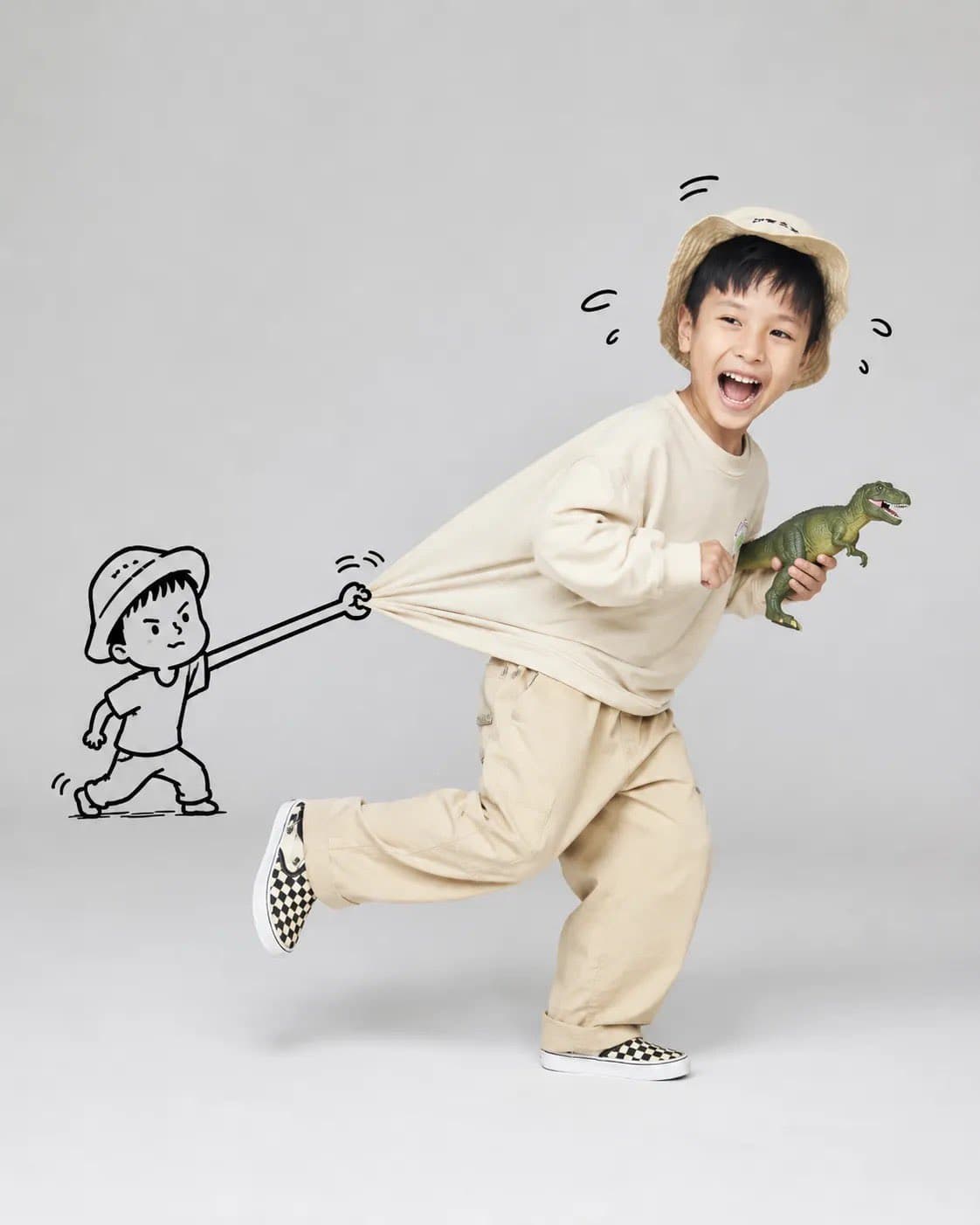
Playful high-key studio portrait of a running subject with a hand-drawn cartoon stick figure pulling the back of the shirt.4:5
Playful high-key studio portrait of a running subject with a hand-drawn cartoon stick figure pulling the back of the shirt.

Social Media

Doodle Pull Studio Run Portrait

An AI studio portrait doodle prompt example for playful running portraits where a hand-drawn cartoon stick figure pulls the subject back by the shirt.

AI studio portrait doodle prompt examplePlayful portraitDoodle overlay
Published Updated

Prompt template

Doodle Pull Studio Run Portrait reusable AI image prompt

Create a playful, high-key studio portrait of [subject] running joyfully across a seamless light gray background, captured mid-stride with one leg lifted and a wide genuine smile.

The subject wears a casual oversized outfit with soft neutral tones or vibrant colors, creating a dynamic sense of motion. Behind them, a simple black hand-drawn cartoon stick figure grabs and stretches the back of their shirt, making the fabric appear elastically pulled as if trying to stop them.

Integrate the doodle character naturally into the scene with expressive motion lines and a humorous facial expression. The subject holds a fun prop, such as a dinosaur toy, oversized lollipop, teddy bear, or balloon, to enhance the playful storytelling.

Use minimalist composition, clean studio lighting, soft shadows, ultra-sharp focus, realistic skin texture, vibrant yet natural colors, whimsical editorial photography, premium campaign aesthetics, highly detailed photorealism, and 8K quality.

Negative prompt

flat sticker doodle, stiff running pose, distorted shirt pull, harsh shadows, cluttered studio floor, fake smile, broken hands, blurry prop, muddy gray background, childish low-detail render
Prompt-specific breakdownWhat makes this prompt different.
Subject and scene

Create a playful, high-key studio portrait of [subject] running joyfully across a seamless light gray background, captured mid-stride with one leg lifted and a wide genuine smile

Use this lighting direction as the anchor for the high-key studio photo with doodle overlay result.
Composition and hierarchy

The subject wears a casual oversized outfit with soft neutral tones or vibrant colors, creating a dynamic sense of motion

Use this part to protect the 4:5 layout and avoid a generic composition.
Lighting and material cues

Behind them, a simple black hand-drawn cartoon stick figure grabs and stretches the back of their shirt, making the fabric appear elastically pulled as if trying to stop them

Treat this as the quality control layer for the high-key studio photo with doodle overlay look.
Style and output constraints

Integrate the doodle character naturally into the scene with expressive motion lines and a humorous facial expression

Preserve this constraint when changing the subject, brand, product, or channel.
Variation promptsRewrite this example for nearby use cases.

These variations keep the core image logic from this prompt while changing one variable at a time.

Change the subject

Create a 4:5 social media image for [new subject]. Keep this prompt logic: Create a playful, high-key studio portrait of [subject] running joyfully across a seamless light gray background, captured mid-stride with one leg lifted and a wide genuine smile. Use High-key studio photo with doodle overlay styling for AI studio portrait doodle prompt example for playful campaign shots, creator posts, and children fashion style visuals, but replace the product, character, place, or audience with [your brief].

Change the channel

Adapt this concept for [ad, product page, thumbnail, story, poster, or hero image]. Preserve the The subject wears a casual oversized outfit with soft neutral tones or vibrant colors, creating a dynamic sense of motion and keep the result focused on AI studio portrait doodle prompt example for playful campaign shots, creator posts, and children fashion style visuals. Adjust crop, spacing, and visual hierarchy for the new channel.

Change the visual mood

Generate a new version with [brighter, darker, more premium, more playful, more editorial, or more minimal] mood. Keep Behind them, a simple black hand-drawn cartoon stick figure grabs and stretches the back of their shirt, making the fabric appear elastically pulled as if trying to stop them as the style anchor and avoid changing the core subject unless the brief requires it.

Review checklistCheck the generated image before reusing it.
  • Confirm the image clearly supports AI studio portrait doodle prompt example for playful campaign shots, creator posts, and children fashion style visuals and does not drift into a generic social media result.
  • Check the main prompt cue: Create a playful, high-key studio portrait of [subject] running joyfully across a seamless light gray background, captured mid-stride with one leg lifted and a wide genuine smile
  • Review the 4:5 crop for subject placement, negative space, and channel fit.
  • Compare the output against the intended high-key studio photo with doodle overlay style before publishing or reusing it.
  • Use the negative prompt to reduce these known issues: flat sticker doodle, stiff running pose, distorted shirt pull, harsh shadows, cluttered studio floor, fake smile, broken hands, blurry prop, muddy gray background, childish low-detail render
Prompt FAQCommon questions about this AI image prompt.

What can I create with the Doodle Pull Studio Run Portrait prompt?

You can use it to create AI studio portrait doodle prompt example for playful campaign shots, creator posts, and children fashion style visuals in a High-key studio photo with doodle overlay style, with a recommended 4:5 aspect ratio and search-friendly image direction.

Can I edit this AI image prompt for another subject?

Yes. Replace the subject, product, place, audience, or brand details while preserving the lighting, composition, aspect ratio, and quality constraints that give the prompt its structure.

Which aspect ratio works best for this prompt?

This example is designed around a 4:5 aspect ratio. You can change it for another channel, but keep the framing and hierarchy consistent when moving to square, vertical, or wide formats.

Should I use the negative prompt?

Yes. The negative prompt helps reduce issues such as flat sticker doodle, stiff running pose, distorted shirt pull, harsh shadows, cluttered studio floor, fake smile, broken hands, blurry prop, muddy gray background, childish low-detail render. Use it as a starting point and add exclusions after reviewing your first result.