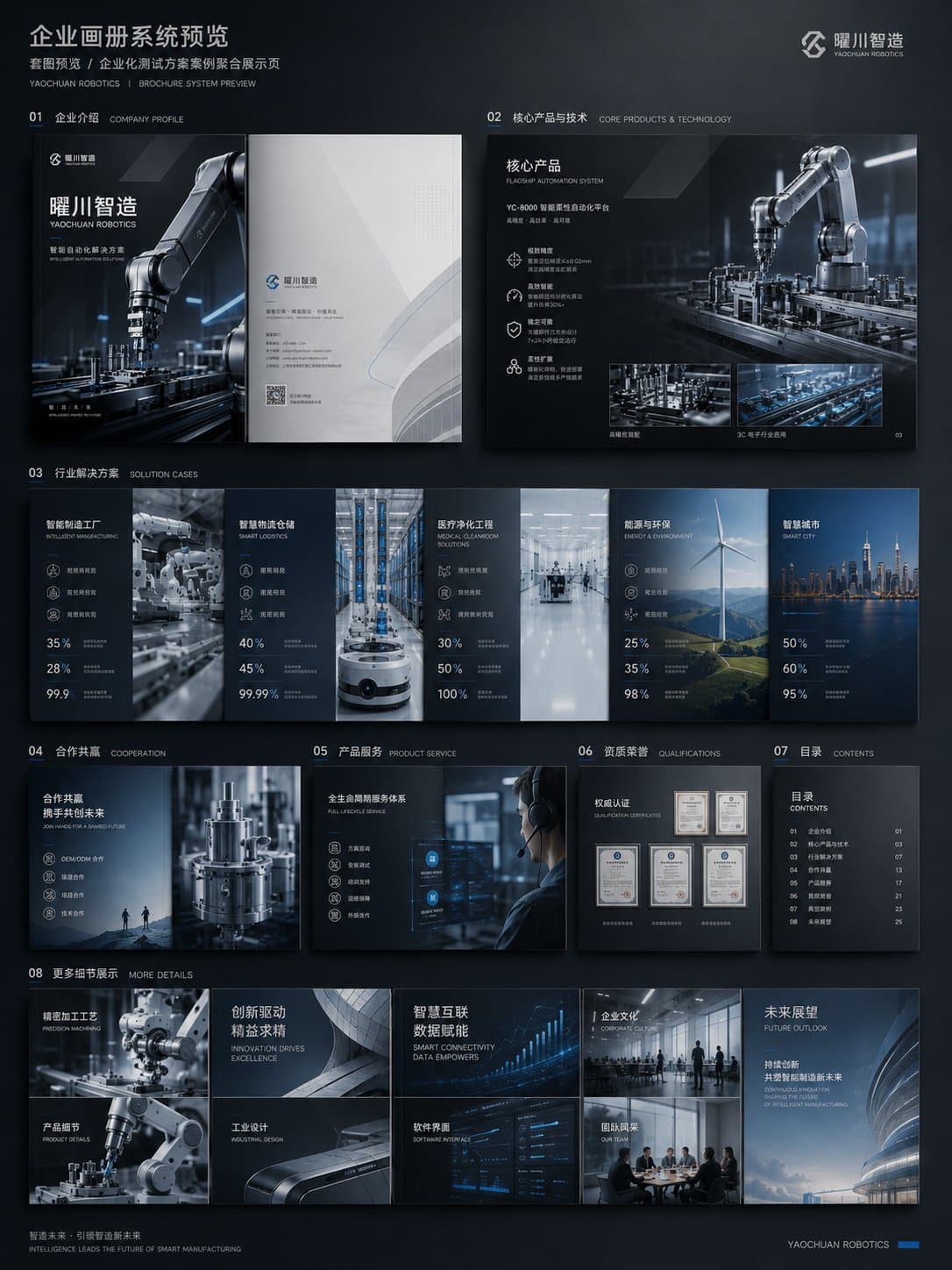
Create a complete enterprise brochure visual system for [COMPANY NAME] in the [INDUSTRY] space.
Deliverable: show a polished preview of the full brochure system, including front cover, back cover, company profile spread, product or technology spread, solution scenario spread, customer case spread, and contact or partnership page.
Visual direction: choose a premium business style such as dark technology, clean white consulting, high-end industrial, or refined art-brand editorial. Keep the page hierarchy consistent across the whole set.
Content design: include product visuals, data modules, diagram blocks, icon rows, pull quotes, case-study cards, and strong headline rhythm. The brochure should feel like finished sales material, not a generic document template.
Style: AI corporate brochure prompt example, enterprise brochure system, B2B visual identity, company profile design, product solution brochure, polished commercial layout.
Negative prompt
template brochure, plain Word document, crowded paragraphs, inconsistent page styles, random stock photos, weak hierarchy, unreadable micro text, real client logos
Prompt-specific breakdownWhat makes this prompt different.
Subject and sceneCreate a complete enterprise brochure visual system for [COMPANY NAME] in the [INDUSTRY] space
Keep this cue visible when adapting the prompt for another ai corporate brochure prompt example for b2b teams, consulting decks, industrial solutions, saas sales material, and company profile redesigns image.Composition and hierarchyDeliverable: show a polished preview of the full brochure system
Use this part to protect the 3:4 layout and avoid a generic composition.Lighting and material cuesproduct or technology spread
Treat this as the quality control layer for the premium b2b brochure system look.Style and output constraintsand contact or partnership page
Preserve this constraint when changing the subject, brand, product, or channel. Variation promptsRewrite this example for nearby use cases.
These variations keep the core image logic from this prompt while changing one variable at a time.
Change the subject
Create a 3:4 brand design image for [new subject]. Keep this prompt logic: Create a complete enterprise brochure visual system for [COMPANY NAME] in the [INDUSTRY] space. Use Premium B2B brochure system styling for AI corporate brochure prompt example for B2B teams, consulting decks, industrial solutions, SaaS sales material, and company profile redesigns, but replace the product, character, place, or audience with [your brief].
Change the channel
Adapt this concept for [ad, product page, thumbnail, story, poster, or hero image]. Preserve the Deliverable: show a polished preview of the full brochure system and keep the result focused on AI corporate brochure prompt example for B2B teams, consulting decks, industrial solutions, SaaS sales material, and company profile redesigns. Adjust crop, spacing, and visual hierarchy for the new channel.
Change the visual mood
Generate a new version with [brighter, darker, more premium, more playful, more editorial, or more minimal] mood. Keep product or technology spread as the style anchor and avoid changing the core subject unless the brief requires it.
Review checklistCheck the generated image before reusing it.
- Confirm the image clearly supports AI corporate brochure prompt example for B2B teams, consulting decks, industrial solutions, SaaS sales material, and company profile redesigns and does not drift into a generic brand design result.
- Check the main prompt cue: Create a complete enterprise brochure visual system for [COMPANY NAME] in the [INDUSTRY] space
- Review the 3:4 crop for subject placement, negative space, and channel fit.
- Compare the output against the intended premium b2b brochure system style before publishing or reusing it.
- Use the negative prompt to reduce these known issues: template brochure, plain Word document, crowded paragraphs, inconsistent page styles, random stock photos, weak hierarchy, unreadable micro text, real client logos
Internal prompt paths
Explore more Brand Design prompts.
Browse nearby workflows, compare prompt packs, or open the generator with this example already loaded.
Prompt FAQCommon questions about this AI image prompt.
What can I create with the Enterprise Brochure Visual System prompt?
You can use it to create AI corporate brochure prompt example for B2B teams, consulting decks, industrial solutions, SaaS sales material, and company profile redesigns in a Premium B2B brochure system style, with a recommended 3:4 aspect ratio and search-friendly image direction.
Can I edit this AI image prompt for another subject?
Yes. Replace the subject, product, place, audience, or brand details while preserving the lighting, composition, aspect ratio, and quality constraints that give the prompt its structure.
Which aspect ratio works best for this prompt?
This example is designed around a 3:4 aspect ratio. You can change it for another channel, but keep the framing and hierarchy consistent when moving to square, vertical, or wide formats.
Should I use the negative prompt?
Yes. The negative prompt helps reduce issues such as template brochure, plain Word document, crowded paragraphs, inconsistent page styles, random stock photos, weak hierarchy, unreadable micro text, real client logos. Use it as a starting point and add exclusions after reviewing your first result.