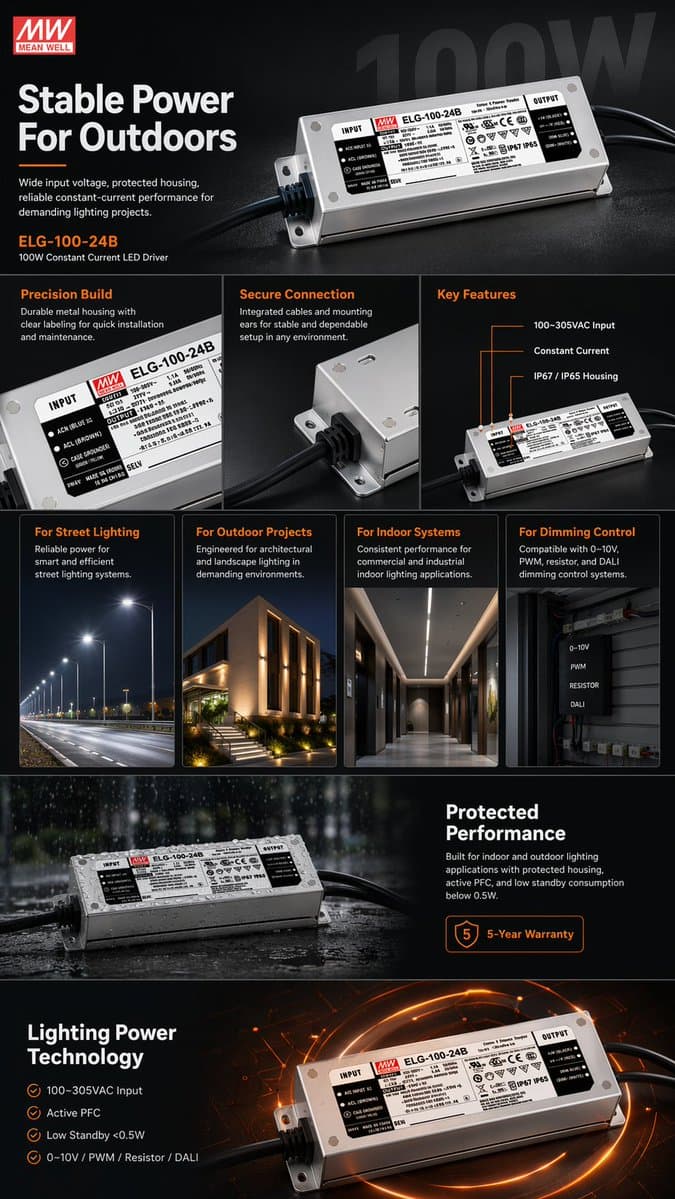
Create a dark-mode e-commerce product infographic for a fictional industrial power supply unit.
Product: a compact metal power supply module with ventilation slots, screw terminals, safety markings, cooling detail, and realistic industrial electronics texture. Use a fictional brand and model name only.
Layout: vertical product listing infographic with a strong hero image, feature callouts, input/output spec table, efficiency highlight, installation diagram, size comparison, safety notes, and product detail close-ups.
Visual style: black and charcoal background, orange accent lines, crisp white typography, precise callout arrows, realistic shadows, and organized ecommerce marketplace hierarchy.
Information design: make labels concise and readable. Separate performance claims, installation notes, compatibility, and package contents into clear modules.
Finish: AI ecommerce product infographic prompt example, e-commerce product infographic, industrial power supply listing visual, electronics product spec sheet, technical product marketing image.
Negative prompt
real electronics brand, unsafe wiring instruction, unreadable spec table, fake certification logos, random components, messy arrows, flat product render, low contrast text, broken perspective
Prompt-specific breakdownWhat makes this prompt different.
Subject and sceneCreate a dark-mode e-commerce product infographic for a fictional industrial power supply unit
Keep this cue visible when adapting the prompt for another ai ecommerce product infographic prompt example for marketplace listings, industrial electronics explainers, product spec sheets, and technical sales visuals image.Composition and hierarchyProduct: a compact metal power supply module with ventilation slots, screw terminals, safety markings, cooling detail, and realistic industrial electronics texture
Review text carefully after generation because typography is often the first place image models drift.Lighting and material cuesUse a fictional brand and model name only
Treat this as the quality control layer for the dark-mode technical ecommerce infographic look.Style and output constraintsLayout: vertical product listing infographic with a strong hero image, feature callouts, input/output spec table, efficiency highlight, installation diagram, size comparison, safety...
Preserve this constraint when changing the subject, brand, product, or channel. Variation promptsRewrite this example for nearby use cases.
These variations keep the core image logic from this prompt while changing one variable at a time.
Change the subject
Create a 9:16 editorial visuals image for [new subject]. Keep this prompt logic: Create a dark-mode e-commerce product infographic for a fictional industrial power supply unit. Use Dark-mode technical ecommerce infographic styling for AI ecommerce product infographic prompt example for marketplace listings, industrial electronics explainers, product spec sheets, and technical sales visuals, but replace the product, character, place, or audience with [your brief].
Change the channel
Adapt this concept for [ad, product page, thumbnail, story, poster, or hero image]. Preserve the Product: a compact metal power supply module with ventilation slots, screw terminals, safety markings, cooling detail, and realistic industrial electronics texture and keep the result focused on AI ecommerce product infographic prompt example for marketplace listings, industrial electronics explainers, product spec sheets, and technical sales visuals. Adjust crop, spacing, and visual hierarchy for the new channel.
Change the visual mood
Generate a new version with [brighter, darker, more premium, more playful, more editorial, or more minimal] mood. Keep Use a fictional brand and model name only as the style anchor and avoid changing the core subject unless the brief requires it.
Review checklistCheck the generated image before reusing it.
- Confirm the image clearly supports AI ecommerce product infographic prompt example for marketplace listings, industrial electronics explainers, product spec sheets, and technical sales visuals and does not drift into a generic editorial visuals result.
- Check the main prompt cue: Create a dark-mode e-commerce product infographic for a fictional industrial power supply unit
- Review the 9:16 crop for subject placement, negative space, and channel fit.
- Compare the output against the intended dark-mode technical ecommerce infographic style before publishing or reusing it.
- Use the negative prompt to reduce these known issues: real electronics brand, unsafe wiring instruction, unreadable spec table, fake certification logos, random components, messy arrows, flat product render, low contrast text, broken perspective
Internal prompt paths
Explore more Editorial Visuals prompts.
Browse nearby workflows, compare prompt packs, or open the generator with this example already loaded.
Prompt FAQCommon questions about this AI image prompt.
What can I create with the Industrial Power Supply Product Infographic prompt?
You can use it to create AI ecommerce product infographic prompt example for marketplace listings, industrial electronics explainers, product spec sheets, and technical sales visuals in a Dark-mode technical ecommerce infographic style, with a recommended 9:16 aspect ratio and search-friendly image direction.
Can I edit this AI image prompt for another subject?
Yes. Replace the subject, product, place, audience, or brand details while preserving the lighting, composition, aspect ratio, and quality constraints that give the prompt its structure.
Which aspect ratio works best for this prompt?
This example is designed around a 9:16 aspect ratio. You can change it for another channel, but keep the framing and hierarchy consistent when moving to square, vertical, or wide formats.
Should I use the negative prompt?
Yes. The negative prompt helps reduce issues such as real electronics brand, unsafe wiring instruction, unreadable spec table, fake certification logos, random components, messy arrows, flat product render, low contrast text, broken perspective. Use it as a starting point and add exclusions after reviewing your first result.