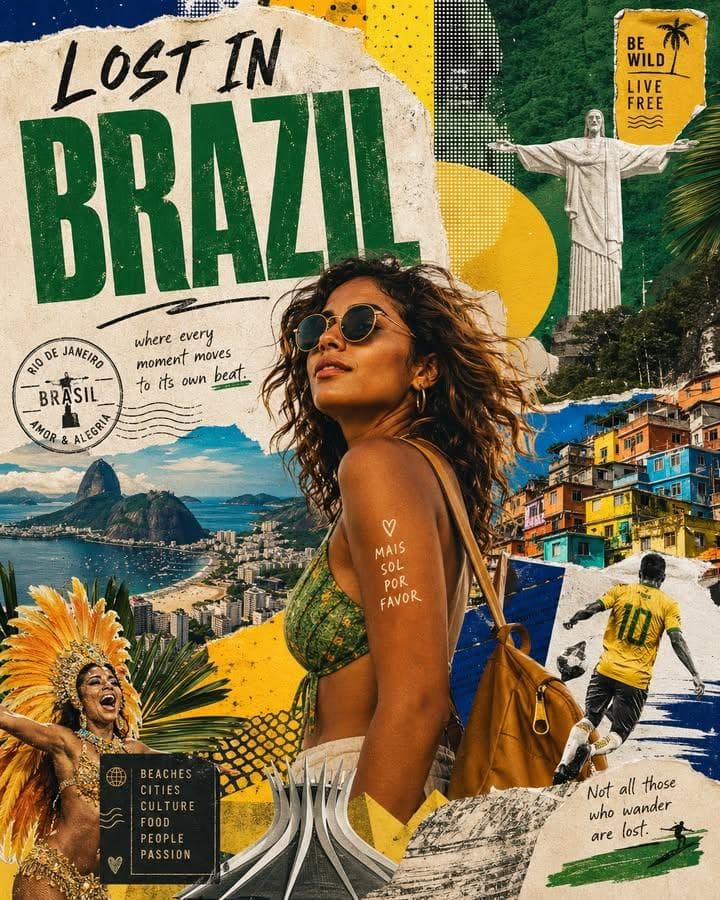
Country travel collage poster with a stylish traveler, landmark layers, paper textures, sticker elements, and bold Lost in destination-style typography.4:5
Country travel collage poster with a stylish traveler, landmark layers, paper textures, sticker elements, and bold Lost in destination-style typography.

Social Media

Lost In Country Travel Poster Collage

An AI travel poster collage prompt example for a destination graphic with a stylish traveler, landmark collage, paper textures, stickers, and clear tourism poster hierarchy.

AI travel poster collage prompt exampleCountry travel collageDestination poster
Published Updated

Prompt template

Lost In Country Travel Poster Collage reusable AI image prompt

Create a stylized travel poster collage for [COUNTRY OR CITY].

Main subject: show a stylish adult international traveler visiting the destination, clearly presented as a traveler with a camera, backpack, sunglasses, map, or suitcase. Do not portray them as a local resident unless requested.

Collage system: surround the traveler with iconic architecture, street scenes, landscapes, local food, transportation, signage, and cultural details from the destination. Use layered paper textures, torn poster edges, sticker elements, hand-drawn marks, and halftone print accents.

Typography: add a large clean title such as "Lost in [DESTINATION]" with smaller travel-date and route details. Keep text readable and balanced.

Style: AI travel poster collage prompt example, country travel collage, destination poster, editorial travel graphic, layered scrapbook tourism design.

Negative prompt

stereotypes, inaccurate landmarks, real tourism board logo, overcrowded collage, unreadable title, passport data, messy stickers, low-detail traveler, copied poster design

Prompt-specific breakdownWhat makes this prompt different.
Subject and scene

Create a stylized travel poster collage for [COUNTRY OR CITY]

Keep this cue visible when adapting the prompt for another ai travel poster collage prompt example for tourism posts, destination guides, creator covers, and editorial travel campaigns image.
Composition and hierarchy

Main subject: show a stylish adult international traveler visiting the destination, clearly presented as a traveler with a camera, backpack, sunglasses, map, or suitcase

Use this part to protect the 4:5 layout and avoid a generic composition.
Lighting and material cues

Do not portray them as a local resident unless requested

Treat this as the quality control layer for the layered destination poster collage look.
Style and output constraints

Collage system: surround the traveler with iconic architecture, street scenes, landscapes, local food, transportation, signage, and cultural details from the destination

Preserve this constraint when changing the subject, brand, product, or channel.
Variation promptsRewrite this example for nearby use cases.

These variations keep the core image logic from this prompt while changing one variable at a time.

Change the subject

Create a 4:5 social media image for [new subject]. Keep this prompt logic: Create a stylized travel poster collage for [COUNTRY OR CITY]. Use Layered destination poster collage styling for AI travel poster collage prompt example for tourism posts, destination guides, creator covers, and editorial travel campaigns, but replace the product, character, place, or audience with [your brief].

Change the channel

Adapt this concept for [ad, product page, thumbnail, story, poster, or hero image]. Preserve the Main subject: show a stylish adult international traveler visiting the destination, clearly presented as a traveler with a camera, backpack, sunglasses, map, or suitcase and keep the result focused on AI travel poster collage prompt example for tourism posts, destination guides, creator covers, and editorial travel campaigns. Adjust crop, spacing, and visual hierarchy for the new channel.

Change the visual mood

Generate a new version with [brighter, darker, more premium, more playful, more editorial, or more minimal] mood. Keep Do not portray them as a local resident unless requested as the style anchor and avoid changing the core subject unless the brief requires it.

Review checklistCheck the generated image before reusing it.
  • Confirm the image clearly supports AI travel poster collage prompt example for tourism posts, destination guides, creator covers, and editorial travel campaigns and does not drift into a generic social media result.
  • Check the main prompt cue: Create a stylized travel poster collage for [COUNTRY OR CITY]
  • Review the 4:5 crop for subject placement, negative space, and channel fit.
  • Compare the output against the intended layered destination poster collage style before publishing or reusing it.
  • Use the negative prompt to reduce these known issues: stereotypes, inaccurate landmarks, real tourism board logo, overcrowded collage, unreadable title, passport data, messy stickers, low-detail traveler, copied poster design
Prompt FAQCommon questions about this AI image prompt.

What can I create with the Lost In Country Travel Poster Collage prompt?

You can use it to create AI travel poster collage prompt example for tourism posts, destination guides, creator covers, and editorial travel campaigns in a Layered destination poster collage style, with a recommended 4:5 aspect ratio and search-friendly image direction.

Can I edit this AI image prompt for another subject?

Yes. Replace the subject, product, place, audience, or brand details while preserving the lighting, composition, aspect ratio, and quality constraints that give the prompt its structure.

Which aspect ratio works best for this prompt?

This example is designed around a 4:5 aspect ratio. You can change it for another channel, but keep the framing and hierarchy consistent when moving to square, vertical, or wide formats.

Should I use the negative prompt?

Yes. The negative prompt helps reduce issues such as stereotypes, inaccurate landmarks, real tourism board logo, overcrowded collage, unreadable title, passport data, messy stickers, low-detail traveler, copied poster design. Use it as a starting point and add exclusions after reviewing your first result.