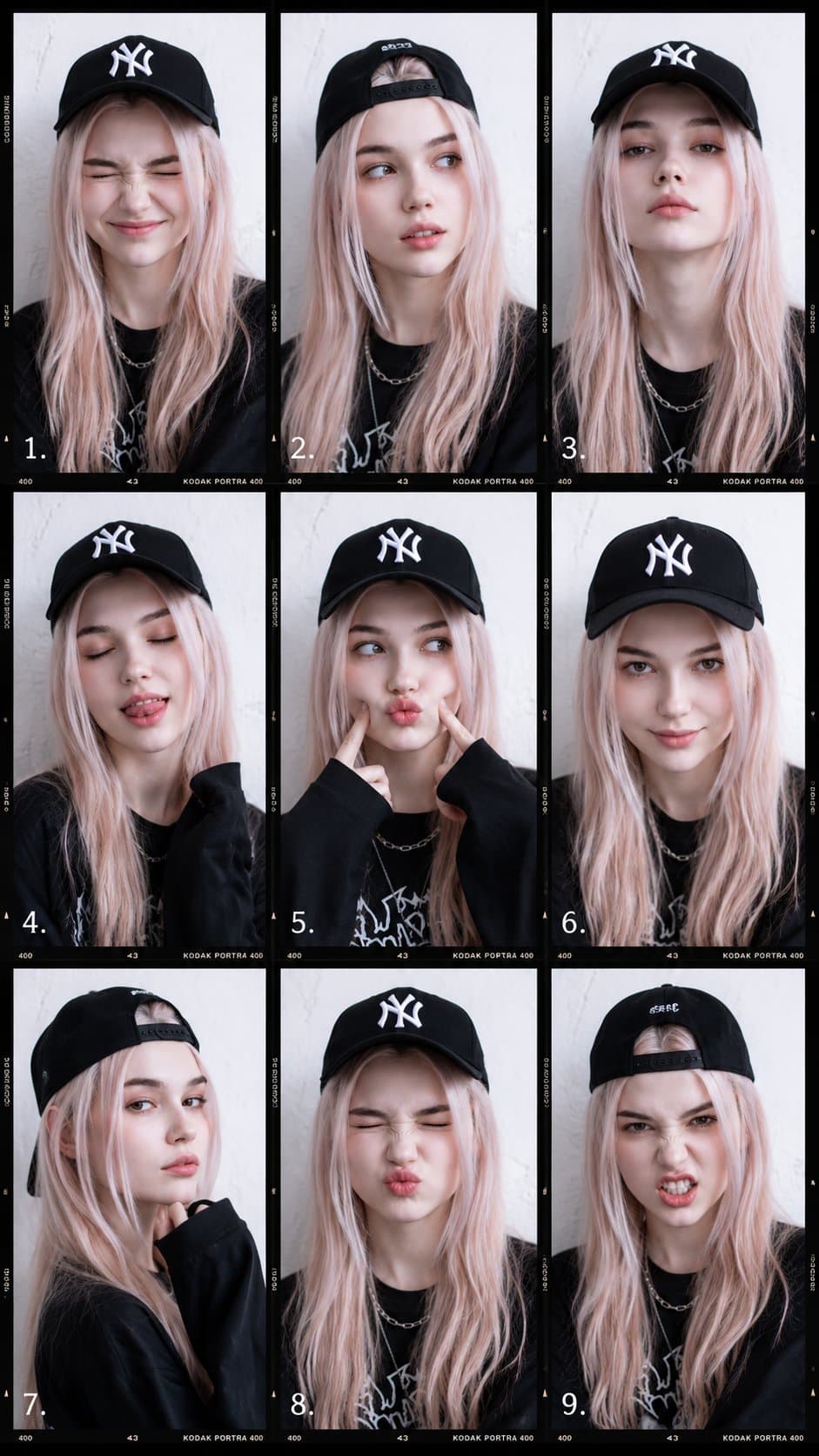
Nine-frame fashion portrait collage with the same adult subject in varied poses, film grain, contact sheet borders, streetwear styling, and editorial layout.9:16
Nine-frame fashion portrait collage with the same adult subject in varied poses, film grain, contact sheet borders, streetwear styling, and editorial layout.

Social Media

Nine Frame Fashion Portrait Collage

An AI fashion portrait collage prompt example for a 9-frame fashion portrait collage with varied poses, film textures, editorial styling, and social-ready layout.

AI fashion portrait collage prompt example9-frame fashion portrait collageLookbook grid
Published Updated

Prompt template

Nine Frame Fashion Portrait Collage reusable AI image prompt

Create a 9-frame fashion portrait collage of one stylish adult subject across a single cohesive editorial shoot. The layout should feel like a contact sheet, photobooth strip, and magazine moodboard combined.

Canvas: 9:16 vertical collage divided into a clean 3x3 grid. Each frame should show the same subject with consistent styling, but vary the pose, crop, expression, lighting angle, and camera distance.

Subject: fashionable adult wearing layered streetwear, cap or casual headwear, jacket, graphic top, relaxed pants, and simple accessories. Keep the wardrobe cohesive across all frames without real brand logos.

Frame variety: include close-up face, half-body portrait, full-body standing pose, seated pose, looking away, candid laugh, direct eye contact, detail crop of hands or accessories, and a movement-blur frame. Add tiny frame numbers, date marks, and subtle camera-note typography.

Texture: mix flash photography, soft daylight, film grain, light leaks, slight blur, and natural imperfections. Keep the collage polished, not chaotic. The 9-frame fashion portrait collage should work as a social media portfolio cover or lookbook teaser.

Style: AI fashion portrait collage prompt example, editorial contact sheet, photobooth fashion layout, realistic portrait photography, creator portfolio grid, modern streetwear lookbook.

Negative prompt

different people in each frame, underage subject, real team logo, unreadable text overload, distorted face repetition, plastic skin, chaotic collage, low-resolution grid, broken borders
How to adapt this prompt

Turn the example into your own brief.

Replace the subject, product, place, or audience.Keep the composition and camera language, then swap the object, brand, city, or customer.
Preserve lighting and material constraints.Reuse the lighting, texture, and finish details that make the image feel specific.
Match the aspect ratio to the channel.Move between square, vertical, and wide crops based on ads, posts, covers, or landing pages.
Tighten the negative prompt after review.Add exclusions for text errors, distorted objects, clutter, or style drift after the first result.

What this prompt is good for

Nine Frame Fashion Portrait Collage is built for AI fashion portrait collage prompt example for creator portfolios, lookbook posts, and editorial social layouts.

Use this AI image prompt when you need a focused Social Media result with a clear style direction, a defined format, and enough visual constraints to avoid generic output.

  • Best search intent: AI fashion portrait collage prompt example, 9-frame fashion portrait collage, and Lookbook grid
  • Primary workflow: AI fashion portrait collage prompt example for creator portfolios, lookbook posts, and editorial social layouts
  • Recommended output format: 9:16

Prompt breakdown

Key controls inside this Photobooth fashion portrait collage prompt.

The prompt combines subject direction, lighting, composition, visual style, and output quality in one reusable brief. Keep those constraints together when you adapt it for your own image.

  • Style anchor: Photobooth fashion portrait collage
  • Category context: Social Media
  • Includes a negative prompt to reduce style drift, distorted details, and unwanted artifacts.

Best variations to try

Adapt this prompt without losing the original image logic.

Start by changing the subject, product, place, color palette, or audience. Keep the camera language and visual hierarchy stable until the result matches the page, ad, post, or campaign you are building.

  • Swap the subject while keeping the 9:16 composition.
  • Turn the style into a new campaign by changing colors, wardrobe, props, or location.
  • Use the prefilled generator link to test the prompt, then refine one variable at a time.

Prompt FAQ

Common questions about this AI image prompt.

What can I create with the Nine Frame Fashion Portrait Collage prompt?

You can use it to create AI fashion portrait collage prompt example for creator portfolios, lookbook posts, and editorial social layouts in a Photobooth fashion portrait collage style, with a recommended 9:16 aspect ratio and search-friendly image direction.

Can I edit this AI image prompt for another subject?

Yes. Replace the subject, product, place, audience, or brand details while preserving the lighting, composition, aspect ratio, and quality constraints that give the prompt its structure.

Which aspect ratio works best for this prompt?

This example is designed around a 9:16 aspect ratio. You can change it for another channel, but keep the framing and hierarchy consistent when moving to square, vertical, or wide formats.

Should I use the negative prompt?

Yes. The negative prompt helps reduce issues such as different people in each frame, underage subject, real team logo, unreadable text overload, distorted face repetition, plastic skin, chaotic collage, low-resolution grid, broken borders. Use it as a starting point and add exclusions after reviewing your first result.