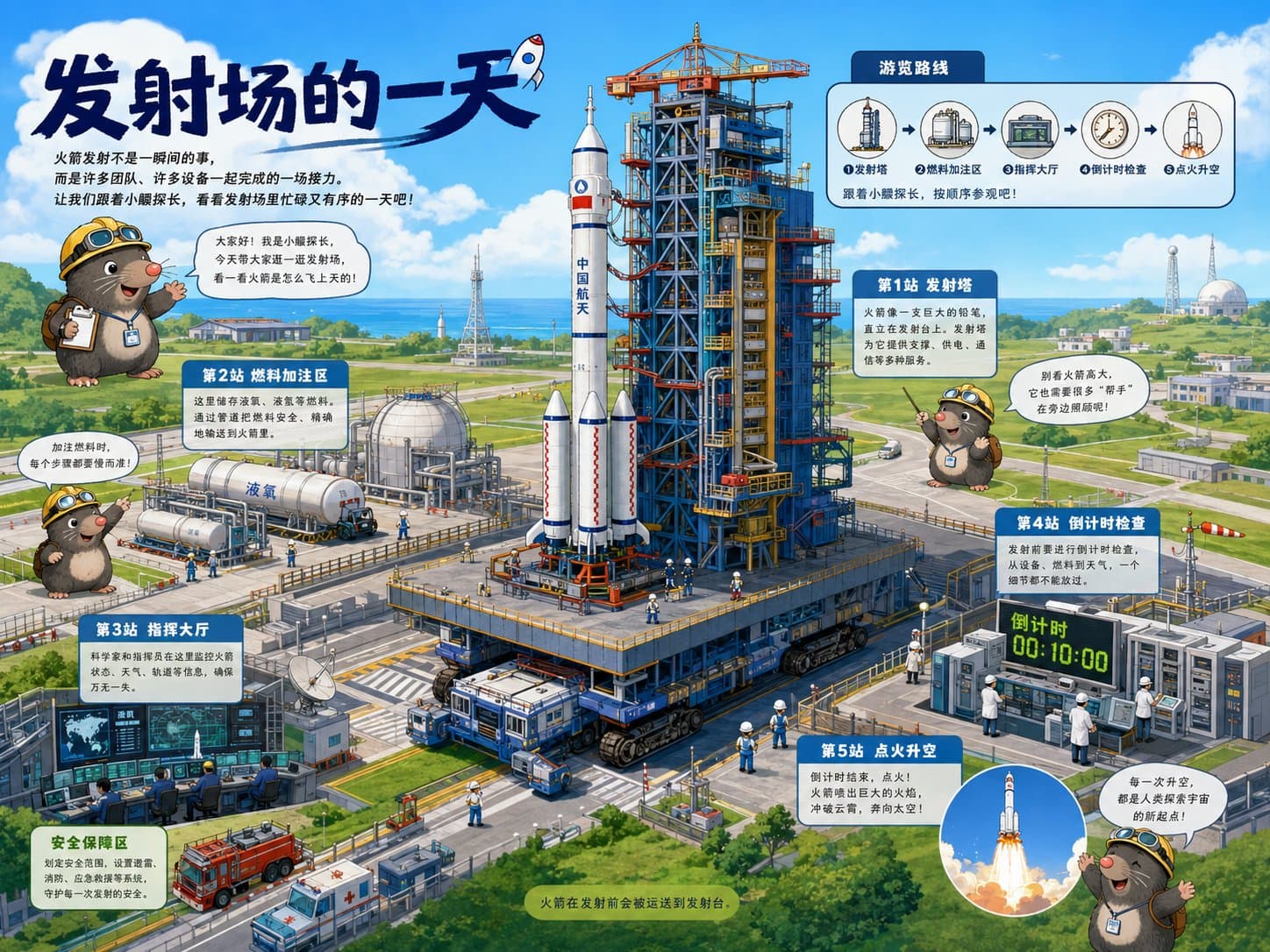
Rocket launch tour map infographic with a launch pad, cute guide mascot, numbered knowledge stations, route diagram, and children science explainer cards.4:3
Rocket launch tour map infographic with a launch pad, cute guide mascot, numbered knowledge stations, route diagram, and children science explainer cards.

Editorial Visuals

Rocket Launch Guided Science Map

An AI educational infographic prompt example for a rocket launch tour map with guided science stations, child-friendly explainer cards, route arrows, and detailed launch-site illustration.

AI educational infographic prompt exampleRocket launch tour mapChildren science explainer
Published Updated

Prompt template

Rocket Launch Guided Science Map reusable AI image prompt

Create a high-finish guided science picture-book infographic about "A Day at a Rocket Launch Site". The image should feel like a children science museum tour map: one large main scene, a clear guided route, cute guide character, knowledge stations, and short readable explainer cards.

Canvas: 4:3 horizontal composition, bright blue sky, clean friendly colors, detailed digital illustration, child-friendly but not childish.

Main scene: show a complete rocket launch facility with a tall rocket on the launch pad, service tower, fuel tanks, command center, safety zone, transport vehicles, engineers, fire truck, antennas, coastal landscape, and distant observatory buildings. The launch pad should be the central visual anchor with clear scale and many ordered details.

Guide character: create an original cute explorer mascot, such as a small mole engineer wearing a yellow hard hat and backpack. Place the guide character in two or three positions around the scene to introduce the tour, point at knowledge cards, and conclude the story.

Information route: draw a visible tour route with arrows or numbered path markers. Include five knowledge stations: "1 Launch Tower", "2 Fuel Loading Zone", "3 Control Room", "4 Countdown Check", and "5 Liftoff". Each station should have a short two-line explanation in simple English. Add a top-right route diagram with small circular icons showing the same sequence.

Layout: title area at top-left, opening guide speech bubble, large central launch-site illustration, modular information cards placed around the scene, a small safety tip box, and a circular liftoff detail inset near the bottom-right. Keep text short and readable.

Style: modern educational infographic prompt example, picture-book science map, detailed but orderly, warm sunlight, clean labels, friendly STEM learning mood, high information density with clear hierarchy.

Negative prompt

dark military mood, explosion disaster scene, unreadable tiny paragraphs, random labels, chaotic route lines, copied mascot character, flat diagram only, low-detail launch pad, cluttered text blocks
How to adapt this prompt

Turn the example into your own brief.

Replace the subject, product, place, or audience.Keep the composition and camera language, then swap the object, brand, city, or customer.
Preserve lighting and material constraints.Reuse the lighting, texture, and finish details that make the image feel specific.
Match the aspect ratio to the channel.Move between square, vertical, and wide crops based on ads, posts, covers, or landing pages.
Tighten the negative prompt after review.Add exclusions for text errors, distorted objects, clutter, or style drift after the first result.

What this prompt is good for

Rocket Launch Guided Science Map is built for AI educational infographic prompt example for children science explainers and museum-style maps.

Use this AI image prompt when you need a focused Editorial Visuals result with a clear style direction, a defined format, and enough visual constraints to avoid generic output.

  • Best search intent: AI educational infographic prompt example, Rocket launch tour map, and Children science explainer
  • Primary workflow: AI educational infographic prompt example for children science explainers and museum-style maps
  • Recommended output format: 4:3

Prompt breakdown

Key controls inside this Guided children science infographic prompt.

The prompt combines subject direction, lighting, composition, visual style, and output quality in one reusable brief. Keep those constraints together when you adapt it for your own image.

  • Style anchor: Guided children science infographic
  • Category context: Editorial Visuals
  • Includes a negative prompt to reduce style drift, distorted details, and unwanted artifacts.

Best variations to try

Adapt this prompt without losing the original image logic.

Start by changing the subject, product, place, color palette, or audience. Keep the camera language and visual hierarchy stable until the result matches the page, ad, post, or campaign you are building.

  • Swap the subject while keeping the 4:3 composition.
  • Turn the style into a new campaign by changing colors, wardrobe, props, or location.
  • Use the prefilled generator link to test the prompt, then refine one variable at a time.

Prompt FAQ

Common questions about this AI image prompt.

What can I create with the Rocket Launch Guided Science Map prompt?

You can use it to create AI educational infographic prompt example for children science explainers and museum-style maps in a Guided children science infographic style, with a recommended 4:3 aspect ratio and search-friendly image direction.

Can I edit this AI image prompt for another subject?

Yes. Replace the subject, product, place, audience, or brand details while preserving the lighting, composition, aspect ratio, and quality constraints that give the prompt its structure.

Which aspect ratio works best for this prompt?

This example is designed around a 4:3 aspect ratio. You can change it for another channel, but keep the framing and hierarchy consistent when moving to square, vertical, or wide formats.

Should I use the negative prompt?

Yes. The negative prompt helps reduce issues such as dark military mood, explosion disaster scene, unreadable tiny paragraphs, random labels, chaotic route lines, copied mascot character, flat diagram only, low-detail launch pad, cluttered text blocks. Use it as a starting point and add exclusions after reviewing your first result.