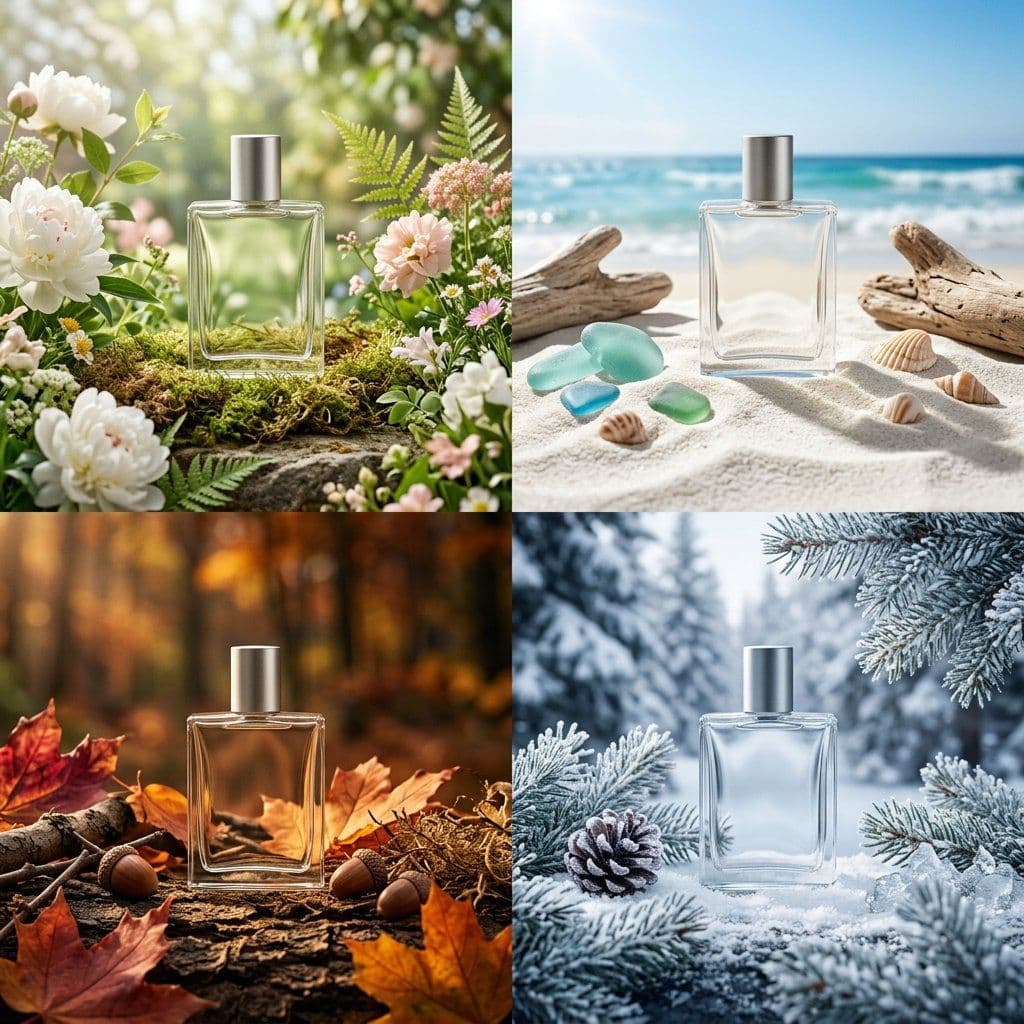
Create a premium 2x2 seasonal packaging campaign grid for [ITEM] in [MATERIAL] packaging.
Phase 1 - Product: design one consistent hero product silhouette with a minimal label system, refined cap or closure detail, clean proportions, and a premium retail-ready finish.
Phase 2 - Grid: build four equal seasonal campaign scenes in a 2x2 layout: spring freshness, summer brightness, autumn warmth, and winter elegance. Each quadrant must feel like a complete campaign world rather than a simple color variant.
Phase 3 - Composition: place the same product in each quadrant with distinct props, background materials, lighting, and atmosphere. Use flowers, fruit, fabric, stone, snow, paper, glass, or natural textures only when they support the season.
Phase 4 - Consistency: keep the same product scale, camera distance, package silhouette, label placement, and premium design language across all four scenes. Let the palette, environment, and styling create the seasonal difference.
Finish: polished commercial product photography, crisp studio lighting, luxury packaging design, organized campaign board layout, realistic shadows, tactile materials, and strong visual hierarchy.
Style: AI seasonal packaging campaign prompt example, 2x2 seasonal grid, product packaging campaign, seasonal brand worlds, premium retail packaging art direction.
Negative prompt
random product shapes, inconsistent packaging, copied real brand logo, cluttered props, uneven grid, unreadable labels, cheap mockup, flat lighting, seasonal symbols without design logic
Prompt-specific breakdownWhat makes this prompt different.
Subject and sceneCreate a premium 2x2 seasonal packaging campaign grid for [ITEM] in [MATERIAL] packaging
Keep this cue visible when adapting the prompt for another ai seasonal packaging campaign prompt example for product packaging concepts, fragrance launch boards, seasonal brand systems, and campaign art direction image.Composition and hierarchyPhase 1 - Product: design one consistent hero product silhouette with a minimal label system, refined cap or closure detail, clean proportions, and a premium retail-ready finish
Review text carefully after generation because typography is often the first place image models drift.Lighting and material cuesPhase 2 - Grid: build four equal seasonal campaign scenes in a 2x2 layout: spring freshness, summer brightness, autumn warmth, and winter elegance
Treat this as the quality control layer for the seasonal packaging campaign board look.Style and output constraintsEach quadrant must feel like a complete campaign world rather than a simple color variant
Preserve this constraint when changing the subject, brand, product, or channel. Variation promptsRewrite this example for nearby use cases.
These variations keep the core image logic from this prompt while changing one variable at a time.
Change the subject
Create a 1:1 brand design image for [new subject]. Keep this prompt logic: Create a premium 2x2 seasonal packaging campaign grid for [ITEM] in [MATERIAL] packaging. Use Seasonal packaging campaign board styling for AI seasonal packaging campaign prompt example for product packaging concepts, fragrance launch boards, seasonal brand systems, and campaign art direction, but replace the product, character, place, or audience with [your brief].
Change the channel
Adapt this concept for [ad, product page, thumbnail, story, poster, or hero image]. Preserve the Phase 1 - Product: design one consistent hero product silhouette with a minimal label system, refined cap or closure detail, clean proportions, and a premium retail-ready finish and keep the result focused on AI seasonal packaging campaign prompt example for product packaging concepts, fragrance launch boards, seasonal brand systems, and campaign art direction. Adjust crop, spacing, and visual hierarchy for the new channel.
Change the visual mood
Generate a new version with [brighter, darker, more premium, more playful, more editorial, or more minimal] mood. Keep Phase 2 - Grid: build four equal seasonal campaign scenes in a 2x2 layout: spring freshness, summer brightness, autumn warmth, and winter elegance as the style anchor and avoid changing the core subject unless the brief requires it.
Review checklistCheck the generated image before reusing it.
- Confirm the image clearly supports AI seasonal packaging campaign prompt example for product packaging concepts, fragrance launch boards, seasonal brand systems, and campaign art direction and does not drift into a generic brand design result.
- Check the main prompt cue: Create a premium 2x2 seasonal packaging campaign grid for [ITEM] in [MATERIAL] packaging
- Review the 1:1 crop for subject placement, negative space, and channel fit.
- Compare the output against the intended seasonal packaging campaign board style before publishing or reusing it.
- Use the negative prompt to reduce these known issues: random product shapes, inconsistent packaging, copied real brand logo, cluttered props, uneven grid, unreadable labels, cheap mockup, flat lighting, seasonal symbols without design logic
Internal prompt paths
Explore more Brand Design prompts.
Browse nearby workflows, compare prompt packs, or open the generator with this example already loaded.
Prompt FAQCommon questions about this AI image prompt.
What can I create with the Seasonal Packaging Campaign Grid prompt?
You can use it to create AI seasonal packaging campaign prompt example for product packaging concepts, fragrance launch boards, seasonal brand systems, and campaign art direction in a Seasonal packaging campaign board style, with a recommended 1:1 aspect ratio and search-friendly image direction.
Can I edit this AI image prompt for another subject?
Yes. Replace the subject, product, place, audience, or brand details while preserving the lighting, composition, aspect ratio, and quality constraints that give the prompt its structure.
Which aspect ratio works best for this prompt?
This example is designed around a 1:1 aspect ratio. You can change it for another channel, but keep the framing and hierarchy consistent when moving to square, vertical, or wide formats.
Should I use the negative prompt?
Yes. The negative prompt helps reduce issues such as random product shapes, inconsistent packaging, copied real brand logo, cluttered props, uneven grid, unreadable labels, cheap mockup, flat lighting, seasonal symbols without design logic. Use it as a starting point and add exclusions after reviewing your first result.