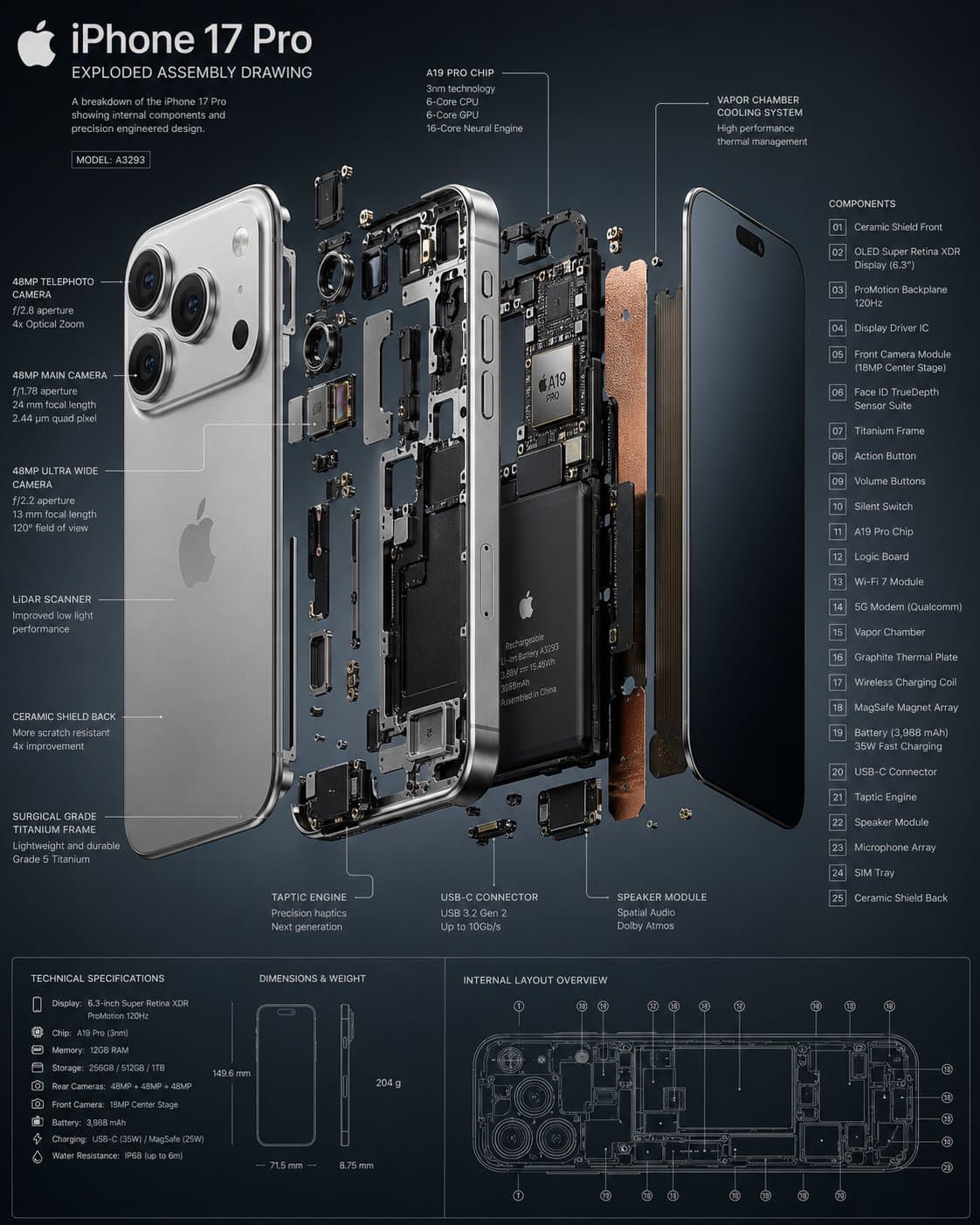
3D exploded smartphone infographic with separated screen, frame, battery, camera, circuit board, sensors, screws, callout lines, and material labels.4:5
3D exploded smartphone infographic with separated screen, frame, battery, camera, circuit board, sensors, screws, callout lines, and material labels.

Editorial Visuals

Smartphone Exploded View Infographic

An AI exploded view infographic prompt example for a 3D smartphone assembly diagram with separated components, technical callouts, material notes, and clean product hierarchy.

AI exploded view infographic prompt example3D exploded smartphoneProduct teardown diagram
Published Updated

Prompt template

Smartphone Exploded View Infographic reusable AI image prompt

Create an insanely detailed 3D exploded assembly drawing of a modern fictional smartphone.

Object: separate the screen glass, display layer, frame, battery, camera modules, speaker units, circuit board, sensors, buttons, screws, cooling layer, and back cover into aligned floating layers.

Information design: add clean callout lines, material notes, component names, short function labels, measurement markers, and a small assembly direction legend. Keep all labels concise and readable.

Visual style: bright studio background, precise engineering layout, realistic metal, glass, graphite, rubber, and circuit textures, crisp shadows under each floating part, and premium product brochure hierarchy.

Style: AI exploded view infographic prompt example, 3D exploded smartphone, product teardown diagram, hardware engineering visual, clean tech infographic.

Negative prompt

real phone brand logo, copied model name, broken electronics, messy wires, unreadable labels, random parts, cartoon style, dark cluttered background, inaccurate floating layers

Prompt-specific breakdownWhat makes this prompt different.
Subject and scene

Create an insanely detailed 3D exploded assembly drawing of a modern fictional smartphone

Keep this cue visible when adapting the prompt for another ai exploded view infographic prompt example for product explainers, tech teardown visuals, hardware marketing, and engineering-style diagrams image.
Composition and hierarchy

Object: separate the screen glass, display layer, frame, battery, camera modules, speaker units, circuit board, sensors, buttons, screws, cooling layer, and back cover into aligned...

Use this part to protect the 4:5 layout and avoid a generic composition.
Lighting and material cues

Information design: add clean callout lines, material notes, component names, short function labels, measurement markers, and a small assembly direction legend

Review text carefully after generation because typography is often the first place image models drift.
Style and output constraints

Keep all labels concise and readable

Review text carefully after generation because typography is often the first place image models drift.
Variation promptsRewrite this example for nearby use cases.

These variations keep the core image logic from this prompt while changing one variable at a time.

Change the subject

Create a 4:5 editorial visuals image for [new subject]. Keep this prompt logic: Create an insanely detailed 3D exploded assembly drawing of a modern fictional smartphone. Use 3D product teardown infographic styling for AI exploded view infographic prompt example for product explainers, tech teardown visuals, hardware marketing, and engineering-style diagrams, but replace the product, character, place, or audience with [your brief].

Change the channel

Adapt this concept for [ad, product page, thumbnail, story, poster, or hero image]. Preserve the Object: separate the screen glass, display layer, frame, battery, camera modules, speaker units, circuit board, sensors, buttons, screws, cooling layer, and back cover into aligned... and keep the result focused on AI exploded view infographic prompt example for product explainers, tech teardown visuals, hardware marketing, and engineering-style diagrams. Adjust crop, spacing, and visual hierarchy for the new channel.

Change the visual mood

Generate a new version with [brighter, darker, more premium, more playful, more editorial, or more minimal] mood. Keep Information design: add clean callout lines, material notes, component names, short function labels, measurement markers, and a small assembly direction legend as the style anchor and avoid changing the core subject unless the brief requires it.

Review checklistCheck the generated image before reusing it.
  • Confirm the image clearly supports AI exploded view infographic prompt example for product explainers, tech teardown visuals, hardware marketing, and engineering-style diagrams and does not drift into a generic editorial visuals result.
  • Check the main prompt cue: Create an insanely detailed 3D exploded assembly drawing of a modern fictional smartphone
  • Review the 4:5 crop for subject placement, negative space, and channel fit.
  • Compare the output against the intended 3d product teardown infographic style before publishing or reusing it.
  • Use the negative prompt to reduce these known issues: real phone brand logo, copied model name, broken electronics, messy wires, unreadable labels, random parts, cartoon style, dark cluttered background, inaccurate floating layers
Prompt FAQCommon questions about this AI image prompt.

What can I create with the Smartphone Exploded View Infographic prompt?

You can use it to create AI exploded view infographic prompt example for product explainers, tech teardown visuals, hardware marketing, and engineering-style diagrams in a 3D product teardown infographic style, with a recommended 4:5 aspect ratio and search-friendly image direction.

Can I edit this AI image prompt for another subject?

Yes. Replace the subject, product, place, audience, or brand details while preserving the lighting, composition, aspect ratio, and quality constraints that give the prompt its structure.

Which aspect ratio works best for this prompt?

This example is designed around a 4:5 aspect ratio. You can change it for another channel, but keep the framing and hierarchy consistent when moving to square, vertical, or wide formats.

Should I use the negative prompt?

Yes. The negative prompt helps reduce issues such as real phone brand logo, copied model name, broken electronics, messy wires, unreadable labels, random parts, cartoon style, dark cluttered background, inaccurate floating layers. Use it as a starting point and add exclusions after reviewing your first result.