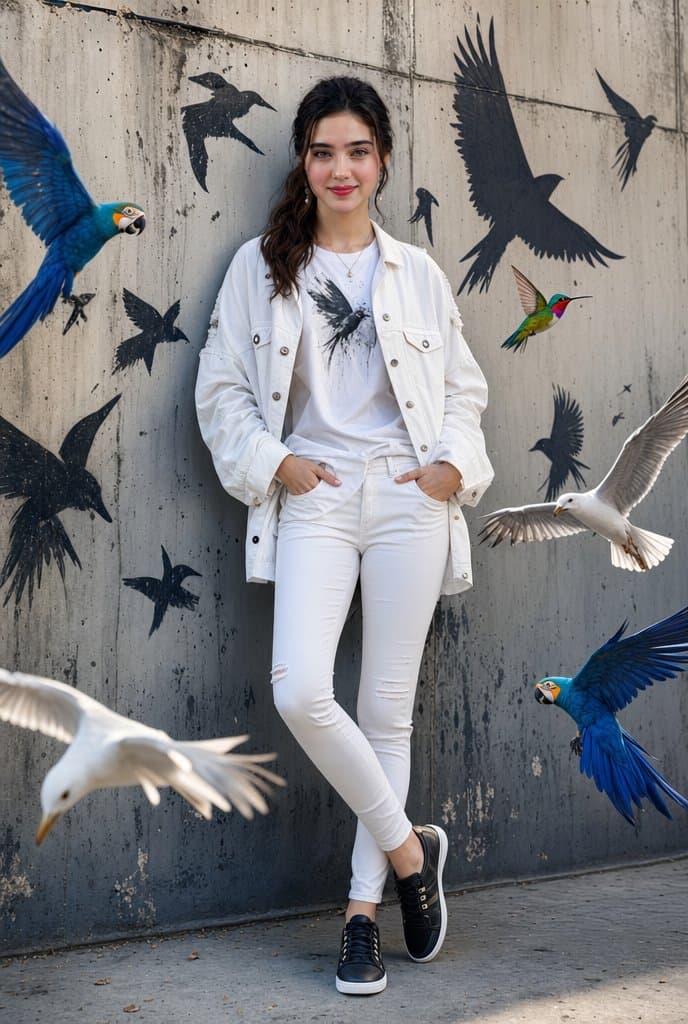
A stylish cinematic portrait of a confident young woman leaning casually against a textured urban concrete wall, surrounded by vibrant flying birds including blue macaws, white seagulls, and a colorful hummingbird. Black graffiti-style bird silhouettes painted on the wall create an artistic street-art vibe. She is wearing a trendy all-white outfit: oversized denim jacket, fitted graphic tee, skinny jeans, and black sneakers. Soft natural daylight, realistic shadows, ultra-detailed fashion photography, urban luxury aesthetic, sharp facial features, glossy hair, high-end editorial style, dynamic composition, photorealistic, depth of field, 8K quality.
Negative prompt
flat lighting, empty wall, missing birds, distorted birds, cluttered outfit, cartoon style, low detail, harsh flash, muddy street colors
How to adapt this prompt
Turn the example into your own brief.
Replace the subject, product, place, or audience.Keep the composition and camera language, then swap the object, brand, city, or customer.Preserve lighting and material constraints.Reuse the lighting, texture, and finish details that make the image feel specific.Match the aspect ratio to the channel.Move between square, vertical, and wide crops based on ads, posts, covers, or landing pages.Tighten the negative prompt after review.Add exclusions for text errors, distorted objects, clutter, or style drift after the first result. What this prompt is good for
Urban Bird Fashion Portrait is built for AI urban fashion portrait prompt example for editorial social posts.
Use this AI image prompt when you need a focused Social Media result with a clear style direction, a defined format, and enough visual constraints to avoid generic output.
- Best search intent: AI urban fashion portrait prompt, Flying birds street portrait, and Streetwear photography
- Primary workflow: AI urban fashion portrait prompt example for editorial social posts
- Recommended output format: 2:3
Prompt breakdown
Key controls inside this Cinematic urban fashion portrait prompt.
The prompt combines subject direction, lighting, composition, visual style, and output quality in one reusable brief. Keep those constraints together when you adapt it for your own image.
- Style anchor: Cinematic urban fashion portrait
- Category context: Social Media
- Includes a negative prompt to reduce style drift, distorted details, and unwanted artifacts.
Best variations to try
Adapt this prompt without losing the original image logic.
Start by changing the subject, product, place, color palette, or audience. Keep the camera language and visual hierarchy stable until the result matches the page, ad, post, or campaign you are building.
- Swap the subject while keeping the 2:3 composition.
- Turn the style into a new campaign by changing colors, wardrobe, props, or location.
- Use the prefilled generator link to test the prompt, then refine one variable at a time.
Internal prompt paths
Explore more Social Media prompts.
Browse nearby workflows, compare prompt packs, or open the generator with this example already loaded.
Prompt FAQ
Common questions about this AI image prompt.
What can I create with the Urban Bird Fashion Portrait prompt?
You can use it to create AI urban fashion portrait prompt example for editorial social posts in a Cinematic urban fashion portrait style, with a recommended 2:3 aspect ratio and search-friendly image direction.
Can I edit this AI image prompt for another subject?
Yes. Replace the subject, product, place, audience, or brand details while preserving the lighting, composition, aspect ratio, and quality constraints that give the prompt its structure.
Which aspect ratio works best for this prompt?
This example is designed around a 2:3 aspect ratio. You can change it for another channel, but keep the framing and hierarchy consistent when moving to square, vertical, or wide formats.
Should I use the negative prompt?
Yes. The negative prompt helps reduce issues such as flat lighting, empty wall, missing birds, distorted birds, cluttered outfit, cartoon style, low detail, harsh flash, muddy street colors. Use it as a starting point and add exclusions after reviewing your first result.