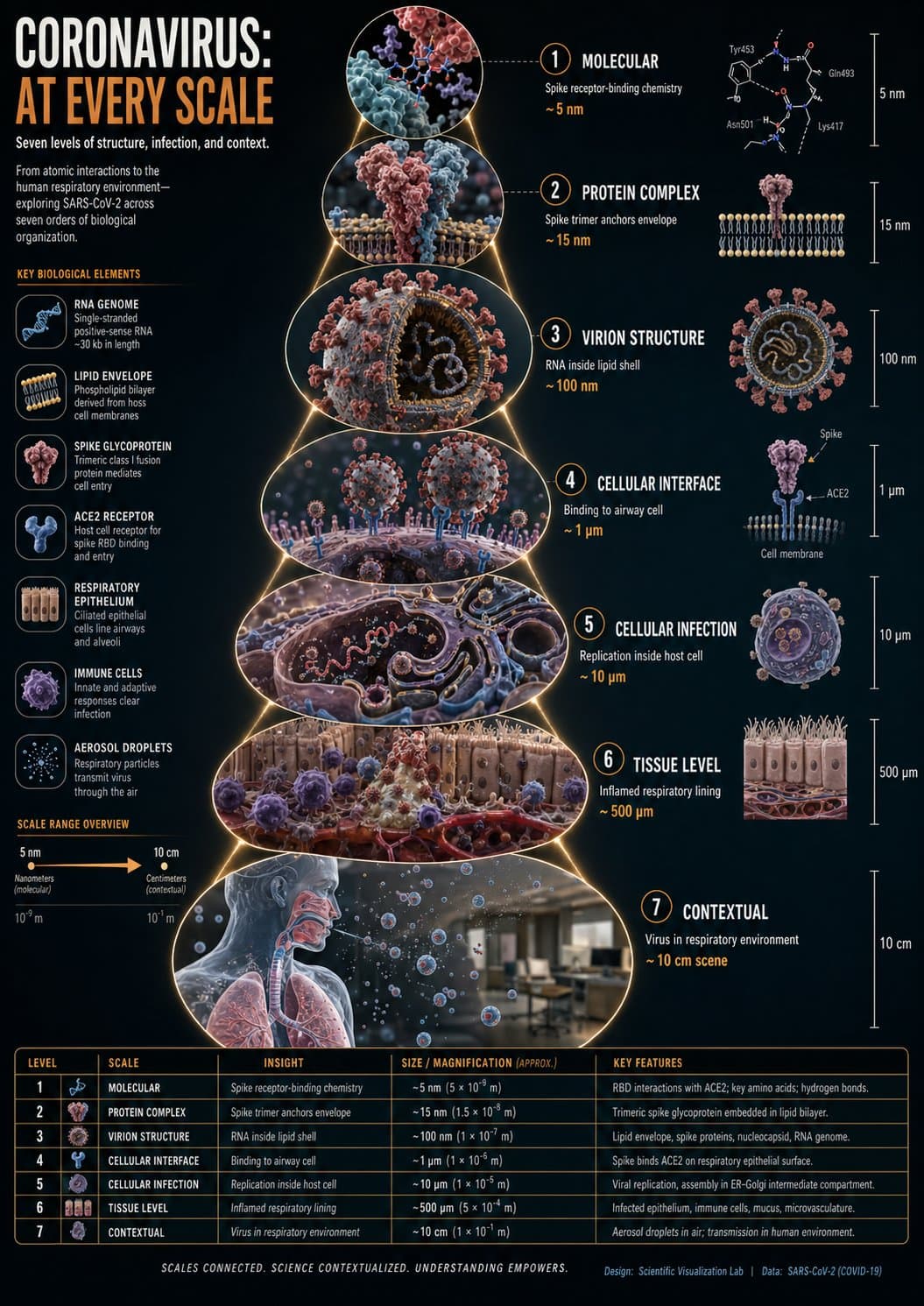
Virus scale infographic with realistic 3D zoom-sequence frames, scientific labels, measurement tags, connecting paths, and clean educational layout.5:7
Virus scale infographic with realistic 3D zoom-sequence frames, scientific labels, measurement tags, connecting paths, and clean educational layout.

Editorial Visuals

Virus Scale Science Infographic

An AI science infographic prompt example for a realistic zoom-sequence virus scale explainer with circular frames, measurement labels, and expanding scientific context.

AI science infographic prompt exampleVirus scale infographic3D zoom sequence
Published Updated

Prompt template

Virus Scale Science Infographic reusable AI image prompt

Create a hyper-realistic 3D zoom-sequence science infographic for [SUBJECT], using a virus scale example.

Layout: arrange six to eight circular or hexagonal frames in an expanding sequence. The innermost frame shows the smallest detectable structural detail, and the outermost frame shows the full subject in its environment.

Frame content: each frame must show a different scale level with a small label, measurement tag, and three-to-five-word insight. Connect frames with subtle zoom-path lines.

Visual style: clean scientific publication design, realistic 3D rendering, white and pale gray background, restrained blue and red accents, crisp legends, and strong educational hierarchy.

Style: AI science infographic prompt example, virus scale infographic, 3D zoom sequence, educational biology diagram, scientific explainer poster.

Negative prompt

medical misinformation, fearmongering, gore, crowded labels, repeated scale frames, unreadable micro text, neon sci-fi UI, cartoon virus, inaccurate proportions

Prompt-specific breakdownWhat makes this prompt different.
Subject and scene

Create a hyper-realistic 3D zoom-sequence science infographic for [SUBJECT], using a virus scale example

Keep this cue visible when adapting the prompt for another ai science infographic prompt example for health explainers, classroom visuals, editorial diagrams, and educational content marketing image.
Composition and hierarchy

Layout: arrange six to eight circular or hexagonal frames in an expanding sequence

Use this part to protect the 5:7 layout and avoid a generic composition.
Lighting and material cues

The innermost frame shows the smallest detectable structural detail, and the outermost frame shows the full subject in its environment

Treat this as the quality control layer for the scientific zoom-sequence infographic look.
Style and output constraints

Frame content: each frame must show a different scale level with a small label, measurement tag, and three-to-five-word insight

Review text carefully after generation because typography is often the first place image models drift.
Variation promptsRewrite this example for nearby use cases.

These variations keep the core image logic from this prompt while changing one variable at a time.

Change the subject

Create a 5:7 editorial visuals image for [new subject]. Keep this prompt logic: Create a hyper-realistic 3D zoom-sequence science infographic for [SUBJECT], using a virus scale example. Use Scientific zoom-sequence infographic styling for AI science infographic prompt example for health explainers, classroom visuals, editorial diagrams, and educational content marketing, but replace the product, character, place, or audience with [your brief].

Change the channel

Adapt this concept for [ad, product page, thumbnail, story, poster, or hero image]. Preserve the Layout: arrange six to eight circular or hexagonal frames in an expanding sequence and keep the result focused on AI science infographic prompt example for health explainers, classroom visuals, editorial diagrams, and educational content marketing. Adjust crop, spacing, and visual hierarchy for the new channel.

Change the visual mood

Generate a new version with [brighter, darker, more premium, more playful, more editorial, or more minimal] mood. Keep The innermost frame shows the smallest detectable structural detail, and the outermost frame shows the full subject in its environment as the style anchor and avoid changing the core subject unless the brief requires it.

Review checklistCheck the generated image before reusing it.
  • Confirm the image clearly supports AI science infographic prompt example for health explainers, classroom visuals, editorial diagrams, and educational content marketing and does not drift into a generic editorial visuals result.
  • Check the main prompt cue: Create a hyper-realistic 3D zoom-sequence science infographic for [SUBJECT], using a virus scale example
  • Review the 5:7 crop for subject placement, negative space, and channel fit.
  • Compare the output against the intended scientific zoom-sequence infographic style before publishing or reusing it.
  • Use the negative prompt to reduce these known issues: medical misinformation, fearmongering, gore, crowded labels, repeated scale frames, unreadable micro text, neon sci-fi UI, cartoon virus, inaccurate proportions
Prompt FAQCommon questions about this AI image prompt.

What can I create with the Virus Scale Science Infographic prompt?

You can use it to create AI science infographic prompt example for health explainers, classroom visuals, editorial diagrams, and educational content marketing in a Scientific zoom-sequence infographic style, with a recommended 5:7 aspect ratio and search-friendly image direction.

Can I edit this AI image prompt for another subject?

Yes. Replace the subject, product, place, audience, or brand details while preserving the lighting, composition, aspect ratio, and quality constraints that give the prompt its structure.

Which aspect ratio works best for this prompt?

This example is designed around a 5:7 aspect ratio. You can change it for another channel, but keep the framing and hierarchy consistent when moving to square, vertical, or wide formats.

Should I use the negative prompt?

Yes. The negative prompt helps reduce issues such as medical misinformation, fearmongering, gore, crowded labels, repeated scale frames, unreadable micro text, neon sci-fi UI, cartoon virus, inaccurate proportions. Use it as a starting point and add exclusions after reviewing your first result.