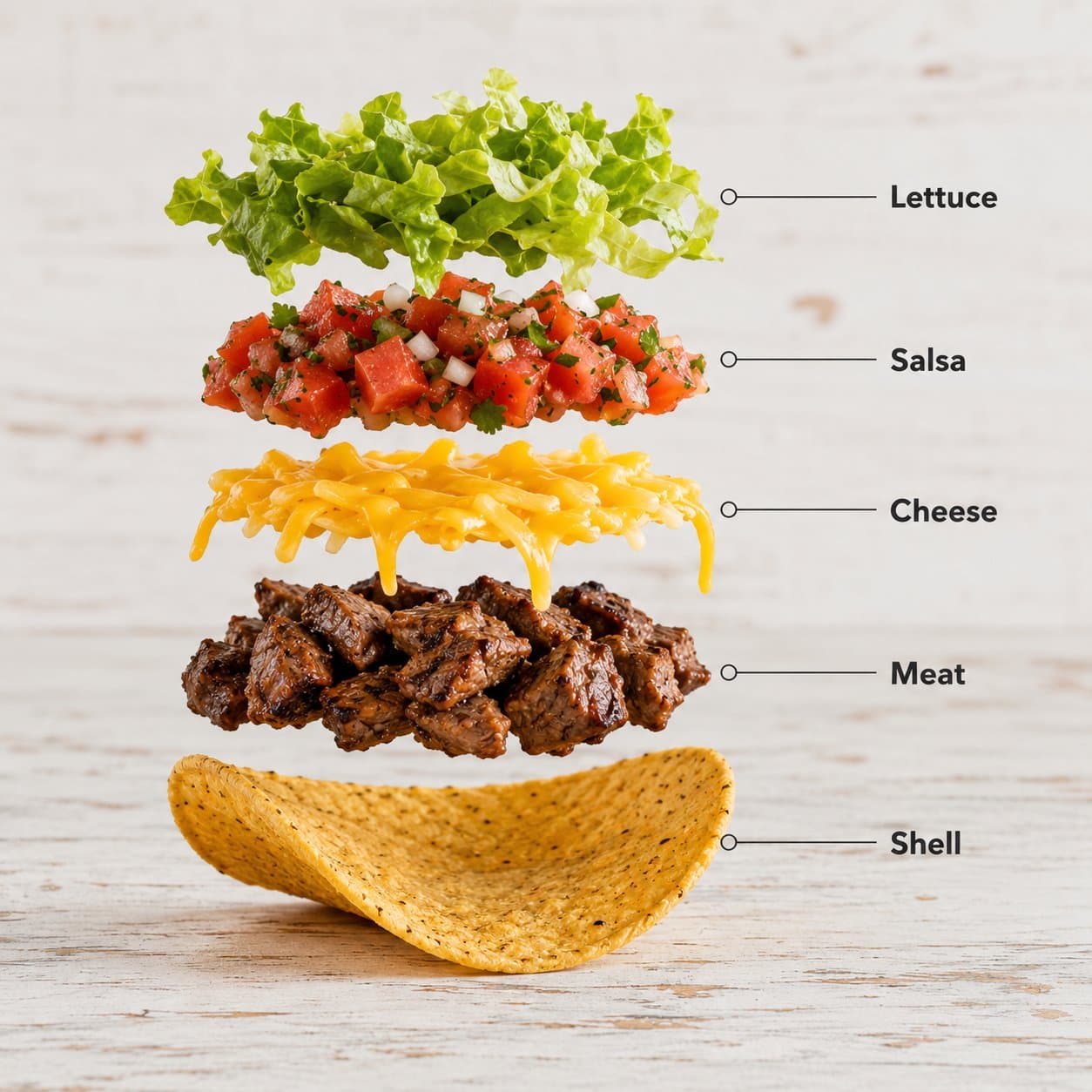
Create a hyper-realistic exploded vertical infographic composition of tacos.
Top -> Bottom structure:
Fresh Lettuce (crisp green texture with natural folds)
-> Tomato & Salsa Layer (juicy diced tomatoes and salsa mix)
-> Melted Cheese (smooth cheddar texture)
-> Grilled Meat Filling (juicy seasoned meat detail)
-> Taco Shell Base (crispy golden shell texture)
Perfect vertical alignment, rustic background, soft studio lighting, realistic shadows beneath each floating element.
Add clean infographic text labels with thin pointer lines using these exact labels:
"Lettuce"
"Salsa"
"Cheese"
"Meat"
"Shell"
Ultra-detailed food textures, premium commercial aesthetic, 8K.
Prompt-specific breakdownWhat makes this prompt different.
Subject and sceneCreate a hyper-realistic exploded vertical infographic composition of tacos
Keep this cue visible when adapting the prompt for another food infographics and menu explainers image.Composition and hierarchyTop -> Bottom structure: Fresh Lettuce (crisp green texture with natural folds) -> Tomato & Salsa Layer (juicy diced tomatoes and salsa mix) -> Melted Cheese (smooth cheddar texture) ->...
Review text carefully after generation because typography is often the first place image models drift.Lighting and material cuesrealistic shadows beneath each floating element
Use this lighting direction as the anchor for the exploded food infographic result.Style and output constraintsAdd clean infographic text labels with thin pointer lines using these exact labels: "Lettuce" "Salsa" "Cheese" "Meat" "Shell" Ultra-detailed food textures, premium commercial aesthetic, 8K.
Review text carefully after generation because typography is often the first place image models drift. Variation promptsRewrite this example for nearby use cases.
These variations keep the core image logic from this prompt while changing one variable at a time.
Change the subject
Create a 1:1 editorial visuals image for [new subject]. Keep this prompt logic: Create a hyper-realistic exploded vertical infographic composition of tacos. Use Exploded food infographic styling for Food infographics and menu explainers, but replace the product, character, place, or audience with [your brief].
Change the channel
Adapt this concept for [ad, product page, thumbnail, story, poster, or hero image]. Preserve the Top -> Bottom structure: Fresh Lettuce (crisp green texture with natural folds) -> Tomato & Salsa Layer (juicy diced tomatoes and salsa mix) -> Melted Cheese (smooth cheddar texture) ->... and keep the result focused on Food infographics and menu explainers. Adjust crop, spacing, and visual hierarchy for the new channel.
Change the visual mood
Generate a new version with [brighter, darker, more premium, more playful, more editorial, or more minimal] mood. Keep realistic shadows beneath each floating element as the style anchor and avoid changing the core subject unless the brief requires it.
Review checklistCheck the generated image before reusing it.
- Confirm the image clearly supports Food infographics and menu explainers and does not drift into a generic editorial visuals result.
- Check the main prompt cue: Create a hyper-realistic exploded vertical infographic composition of tacos
- Review the 1:1 crop for subject placement, negative space, and channel fit.
- Compare the output against the intended exploded food infographic style before publishing or reusing it.
- Add a negative prompt after the first result if you see distorted details, clutter, unreadable text, or style drift.
Internal prompt paths
Explore more prompts.
Browse nearby workflows, compare prompt packs, or open the generator with this example already loaded.
Prompt FAQCommon questions about this AI image prompt.
What can I create with the Exploded Taco Infographic prompt?
You can use it to create Food infographics and menu explainers in a Exploded food infographic style, with a recommended 1:1 aspect ratio and search-friendly image direction.
Can I edit this AI image prompt for another subject?
Yes. Replace the subject, product, place, audience, or brand details while preserving the lighting, composition, aspect ratio, and quality constraints that give the prompt its structure.
Which aspect ratio works best for this prompt?
This example is designed around a 1:1 aspect ratio. You can change it for another channel, but keep the framing and hierarchy consistent when moving to square, vertical, or wide formats.
Should I use the negative prompt?
A negative prompt is optional for this example. Add exclusions after the first result if you notice distorted objects, clutter, unreadable text, or a style that drifts away from your brief.