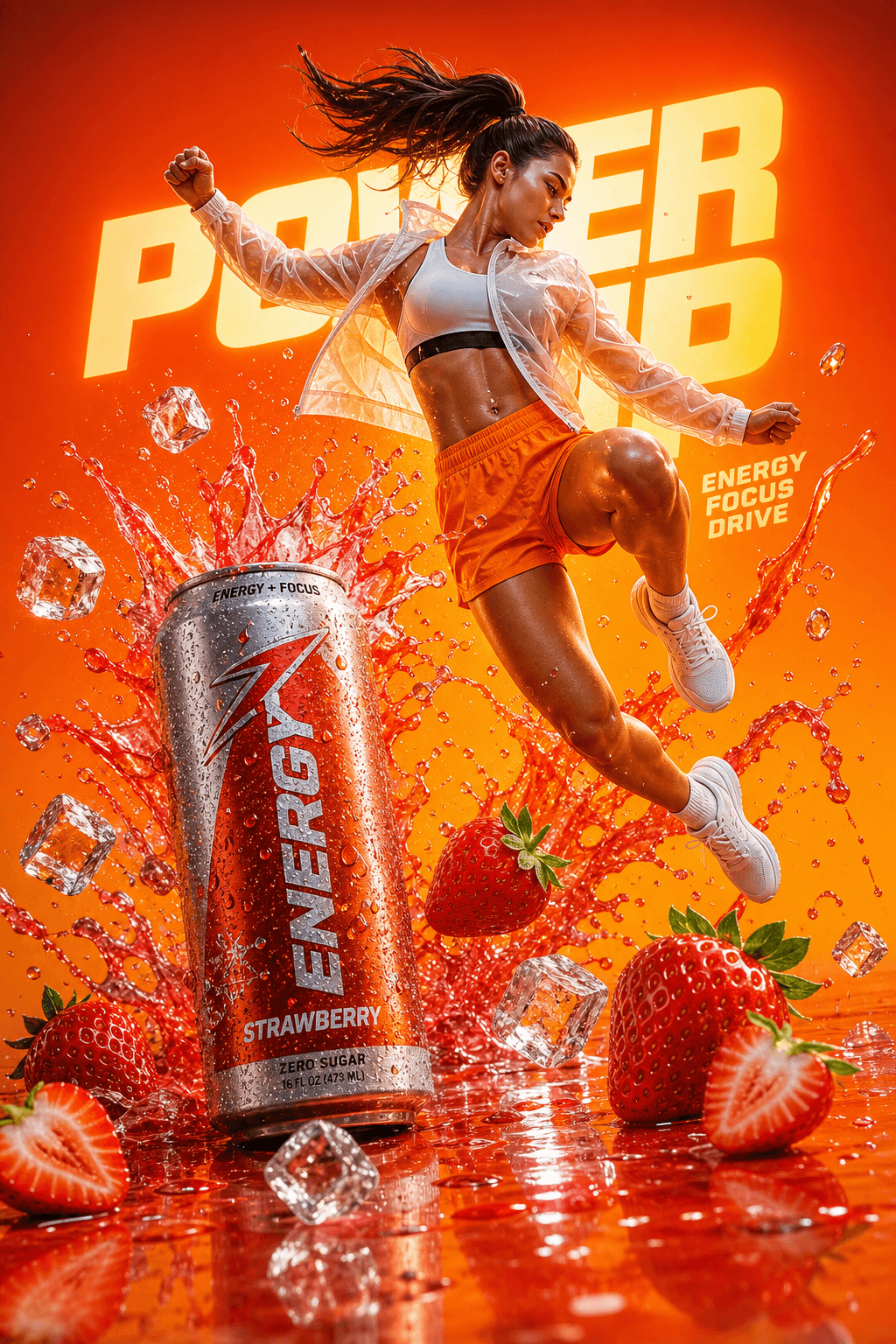
A hyper-realistic commercial advertisement blending energy drink and sports branding. A dynamic athletic woman mid-air jump, wearing modern sportswear (light translucent jacket, orange shorts, white sneakers), surrounded by explosive splashes of red strawberry liquid and flying ice cubes. A cold metallic energy drink can (strawberry flavor) bursting with droplets sits in the foreground, covered in condensation. Fresh strawberries scattered on a glossy reflective surface.
Bright cinematic lighting with dramatic highlights and motion effects. Vibrant orange gradient background with bold glowing typography behind the subject. Ultra-detailed, high contrast, sharp focus, commercial product photography style, 8K resolution, advertising poster aesthetic, energetic, powerful, refreshing mood.
Negative prompt
old reused image, low quality, flat lighting, distorted product can, messy typography, weak motion
How to adapt this prompt
Turn the example into your own brief.
Replace the subject, product, place, or audience.Keep the composition and camera language, then swap the object, brand, city, or customer.Preserve lighting and material constraints.Reuse the lighting, texture, and finish details that make the image feel specific.Match the aspect ratio to the channel.Move between square, vertical, and wide crops based on ads, posts, covers, or landing pages.Tighten the negative prompt after review.Add exclusions for text errors, distorted objects, clutter, or style drift after the first result. What this prompt is good for
Gemini AI Energy Drink Photo Prompt Copy Paste is built for Commercial beverage advertising prompts.
Use this AI image prompt when you need a focused Product Photography result with a clear style direction, a defined format, and enough visual constraints to avoid generic output.
- Best search intent: Gemini AI, Energy drink, and Copy paste prompt
- Primary workflow: Commercial beverage advertising prompts
- Recommended output format: 2:3
Prompt breakdown
Key controls inside this Hyper-realistic beverage campaign prompt.
The prompt combines subject direction, lighting, composition, visual style, and output quality in one reusable brief. Keep those constraints together when you adapt it for your own image.
- Style anchor: Hyper-realistic beverage campaign
- Category context: Product Photography
- Includes a negative prompt to reduce style drift, distorted details, and unwanted artifacts.
Best variations to try
Adapt this prompt without losing the original image logic.
Start by changing the subject, product, place, color palette, or audience. Keep the camera language and visual hierarchy stable until the result matches the page, ad, post, or campaign you are building.
- Swap the subject while keeping the 2:3 composition.
- Turn the style into a new campaign by changing colors, wardrobe, props, or location.
- Use the prefilled generator link to test the prompt, then refine one variable at a time.
Internal prompt paths
Explore more Product Photography prompts.
Browse nearby workflows, compare prompt packs, or open the generator with this example already loaded.
Prompt FAQ
Common questions about this AI image prompt.
What can I create with the Gemini AI Energy Drink Photo Prompt Copy Paste prompt?
You can use it to create Commercial beverage advertising prompts in a Hyper-realistic beverage campaign style, with a recommended 2:3 aspect ratio and search-friendly image direction.
Can I edit this AI image prompt for another subject?
Yes. Replace the subject, product, place, audience, or brand details while preserving the lighting, composition, aspect ratio, and quality constraints that give the prompt its structure.
Which aspect ratio works best for this prompt?
This example is designed around a 2:3 aspect ratio. You can change it for another channel, but keep the framing and hierarchy consistent when moving to square, vertical, or wide formats.
Should I use the negative prompt?
Yes. The negative prompt helps reduce issues such as old reused image, low quality, flat lighting, distorted product can, messy typography, weak motion. Use it as a starting point and add exclusions after reviewing your first result.