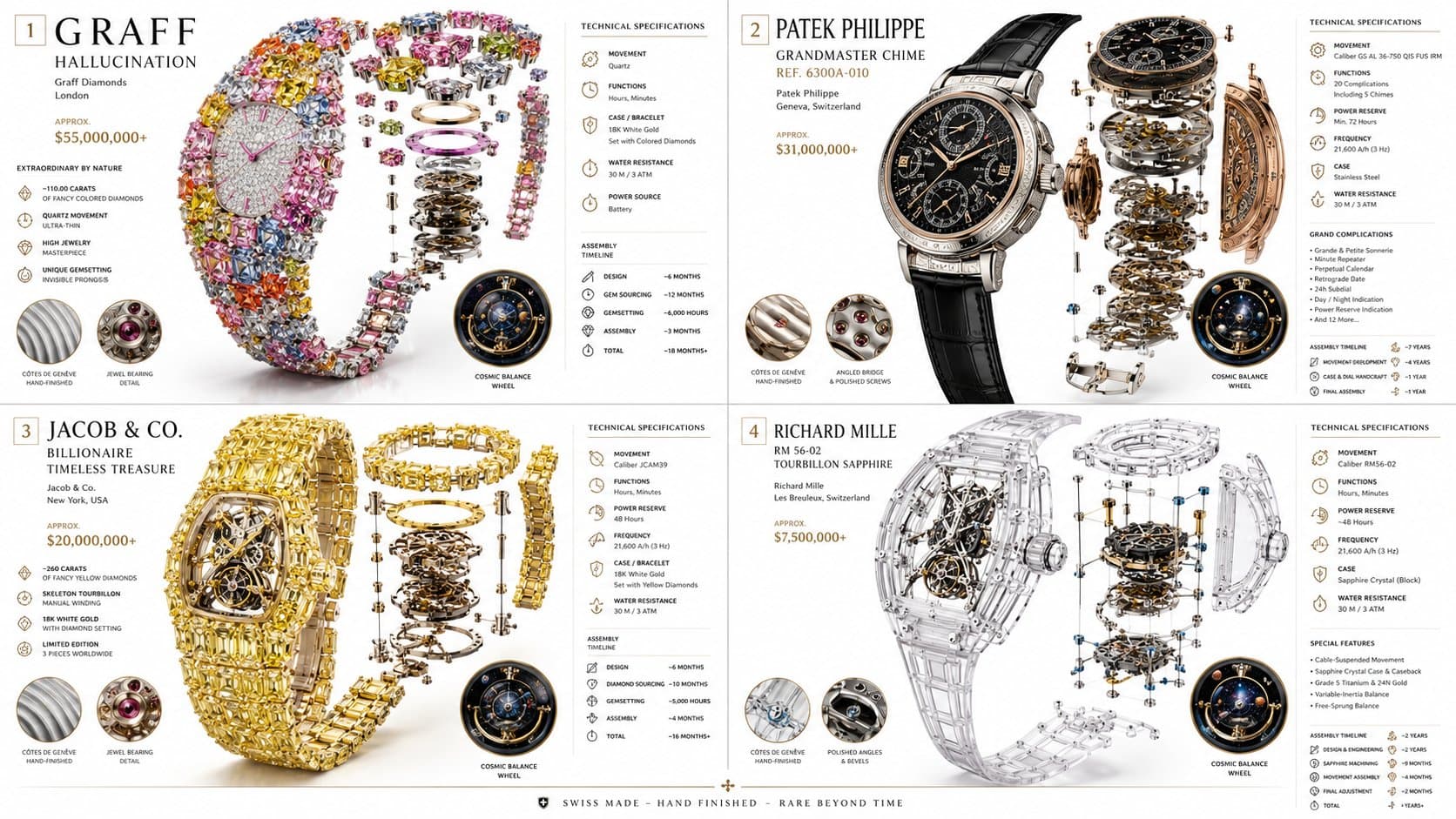
Luxury mechanical watch infographic with four original timepieces, exploded movement diagrams, premium materials, and elegant technical brochure callouts.16:9
Luxury mechanical watch infographic with four original timepieces, exploded movement diagrams, premium materials, and elegant technical brochure callouts.

Product Photography

Luxury Mechanical Watch Infographic

An AI luxury mechanical watch infographic prompt example for a 2x2 technical watch grid with exploded movements, premium materials, and brochure-style callouts.

AI luxury mechanical watch infographic prompt exampleMechanical watch infographicExploded movement diagram
Published Updated

Prompt template

Luxury Mechanical Watch Infographic reusable AI image prompt

Create a 2x2 grid luxury mechanical watch infographic in a clean 16:9 composition.

Subject: show four original high-end mechanical timepieces, each displayed in full mechanical glory. The dial, hands, movement, transparent case, strap, gears, springs, jewels, and balance wheel should float in perfect alignment against a bright white studio background.

Information design: add elegant technical callouts for power reserve, frequency, complication type, hand-finishing grade, movement architecture, assembly timeline, and material notes. Use refined Swiss manufacture brochure styling with precise data panels and tasteful micro labels.

Materials: brushed titanium, sapphire crystal, rose-gold gears, polished steel screws, alligator-style leather texture, matte premium paper, subtle embossed title treatment, and realistic reflections on polished surfaces.

Style: AI luxury mechanical watch infographic prompt example, mechanical watch infographic, exploded movement diagram, premium watch advertisement, technical product brochure, hyper-detailed studio lighting.

Negative prompt

real watch brand logo, copied model name, cluttered grid, unreadable labels, cheap catalog layout, distorted gears, flat metal texture, dark muddy lighting, low-detail movement parts
How to adapt this prompt

Turn the example into your own brief.

Replace the subject, product, place, or audience.Keep the composition and camera language, then swap the object, brand, city, or customer.
Preserve lighting and material constraints.Reuse the lighting, texture, and finish details that make the image feel specific.
Match the aspect ratio to the channel.Move between square, vertical, and wide crops based on ads, posts, covers, or landing pages.
Tighten the negative prompt after review.Add exclusions for text errors, distorted objects, clutter, or style drift after the first result.

What this prompt is good for

Luxury Mechanical Watch Infographic is built for AI luxury mechanical watch infographic prompt example for watch ads, product explainers, ecommerce visuals, and technical brochure concepts.

Use this AI image prompt when you need a focused Product Photography result with a clear style direction, a defined format, and enough visual constraints to avoid generic output.

  • Best search intent: AI luxury mechanical watch infographic prompt example, Mechanical watch infographic, and Exploded movement diagram
  • Primary workflow: AI luxury mechanical watch infographic prompt example for watch ads, product explainers, ecommerce visuals, and technical brochure concepts
  • Recommended output format: 16:9

Prompt breakdown

Key controls inside this Luxury watch technical infographic prompt.

The prompt combines subject direction, lighting, composition, visual style, and output quality in one reusable brief. Keep those constraints together when you adapt it for your own image.

  • Style anchor: Luxury watch technical infographic
  • Category context: Product Photography
  • Includes a negative prompt to reduce style drift, distorted details, and unwanted artifacts.

Best variations to try

Adapt this prompt without losing the original image logic.

Start by changing the subject, product, place, color palette, or audience. Keep the camera language and visual hierarchy stable until the result matches the page, ad, post, or campaign you are building.

  • Swap the subject while keeping the 16:9 composition.
  • Turn the style into a new campaign by changing colors, wardrobe, props, or location.
  • Use the prefilled generator link to test the prompt, then refine one variable at a time.

Prompt FAQ

Common questions about this AI image prompt.

What can I create with the Luxury Mechanical Watch Infographic prompt?

You can use it to create AI luxury mechanical watch infographic prompt example for watch ads, product explainers, ecommerce visuals, and technical brochure concepts in a Luxury watch technical infographic style, with a recommended 16:9 aspect ratio and search-friendly image direction.

Can I edit this AI image prompt for another subject?

Yes. Replace the subject, product, place, audience, or brand details while preserving the lighting, composition, aspect ratio, and quality constraints that give the prompt its structure.

Which aspect ratio works best for this prompt?

This example is designed around a 16:9 aspect ratio. You can change it for another channel, but keep the framing and hierarchy consistent when moving to square, vertical, or wide formats.

Should I use the negative prompt?

Yes. The negative prompt helps reduce issues such as real watch brand logo, copied model name, cluttered grid, unreadable labels, cheap catalog layout, distorted gears, flat metal texture, dark muddy lighting, low-detail movement parts. Use it as a starting point and add exclusions after reviewing your first result.